


5 Jira cons you can’t ignore: Especially with Data Center shutting down
Jira Data Center is shutting down — but maybe that’s not such bad news. If your teams are already frustrated by rising costs, clunky scaling, confusing updates and cloud lock-in, now is the perfect time to rethink your setup and explore better on-premise alternatives.

Table of contents
Jira Data Center EOL: Goodbye Jira, finally?
5 key pains clients typically have with Jira
1. Unpredicted interface changes
2. Jira performance issues
3. Cloud lock-in and discontinued on-premises support
4. Jira licensing inflexibility
5. Jira scaling pain and sprint struggle
Jira alternative with on-premises support
TL;DR
Jira Data Center is ending, and for teams tired of its complexity, cost, and cloud lock-in, now’s the time to consider a simpler, on-premise-ready alternative like Easy8.
Jira Data Center EOL: Goodbye Jira, finally?
It is official — Atlassian's Jira Data Center will reach end-of-life by March 2029. Organisations should start planning their migration strategies, considering alternatives like Atlassian Cloud or other on-premises solutions.
But think about it twice — is it really such bad news when you can recall at least 5 pain points that Jira is causing its users and teams?
5 key pains clients typically have with Jira
Based on real conversations with Jira users, we've identified four recurring pain points that disrupt daily operations — and we’re offering practical solutions to help teams regain control.
1. Unpredicted interface changes
One of the most common frustrations with Jira is how often the interface changes — without warning.
Frequent UI updates and new feature rollouts often land without proper communication or documentation. Users suddenly find that buttons have moved, flows behave differently, or worse — risky design choices appear, like a “remove profile” button placed right under the language switch.
Solution? Try tools that focus on stability (such as Easy8), which give administrators more control over when changes are rolled out. Updates can be scheduled, communicated, and tested before they are implemented, ensuring they do not impact end-users.
2. Jira performance issues
Performance is another significant issue, with many users reporting slow load times and delays when performing tasks like changing ticket types or adding tickets to epics. These slowdowns can be frustrating and time-consuming, impacting productivity across teams.
Solution? Consider trying Easy8, which generally offers better performance compared to Jira for certain project management scenarios.
3. Cloud lock-in and discontinued on-premises support
Another growing concern for many organisations is Atlassian’s decision to end support for both Server and Data Center editions, effectively forcing clients into its cloud ecosystem.
While this might work for some, it’s a major red flag for companies in regulated industries like defence, aerospace, or manufacturing. These sectors have strict compliance requirements that often mandate on-premises hosting and full control over infrastructure.
Moving to the cloud means losing visibility over where data is stored and when updates are applied — a compliance and security risk many simply cannot afford.

Solution? Some platforms still offer flexible deployment: on-premises, private cloud, or hybrid setups. This allows companies to align hosting with security policies and industry regulations.
4. Jira licensing inflexibility
Licensing is another area where Jira creates unnecessary pain. There’s no distinction between internal team members and external collaborators — everyone needs a full-priced licence.
In one real-world case, a company with 40 internal developers and 200 external users had to pay the same rate for all 240 users. That added up to $2,700 per month — over $25,000 per year — just to keep everyone connected. As teams and partner networks grow, so do the costs, making Jira increasingly difficult to justify from a budget perspective.
Solution? Look for more flexible licensing models that distinguish between full users and or external users. This makes collaboration more affordable and predictable for companies working with clients or partners.
5. Jira scaling pain and sprint struggle
Jira works well for individual agile teams running a single Scrum board — but it quickly breaks down at scale.
When multiple teams are working across several projects in parallel, things get messy. It is indeed a challenge of managing three teams and 250 users running simultaneous sprints, where even basic visibility required a patchwork of custom filters and JQL queries. For many managers, that means spending more time building dashboards than actually managing projects.
Solution? Each Product Backlog Item (PBI) in Easy8 Scrum Boards is linked to a project, enabling teams to work across several projects and deliver incremental improvements to each one.
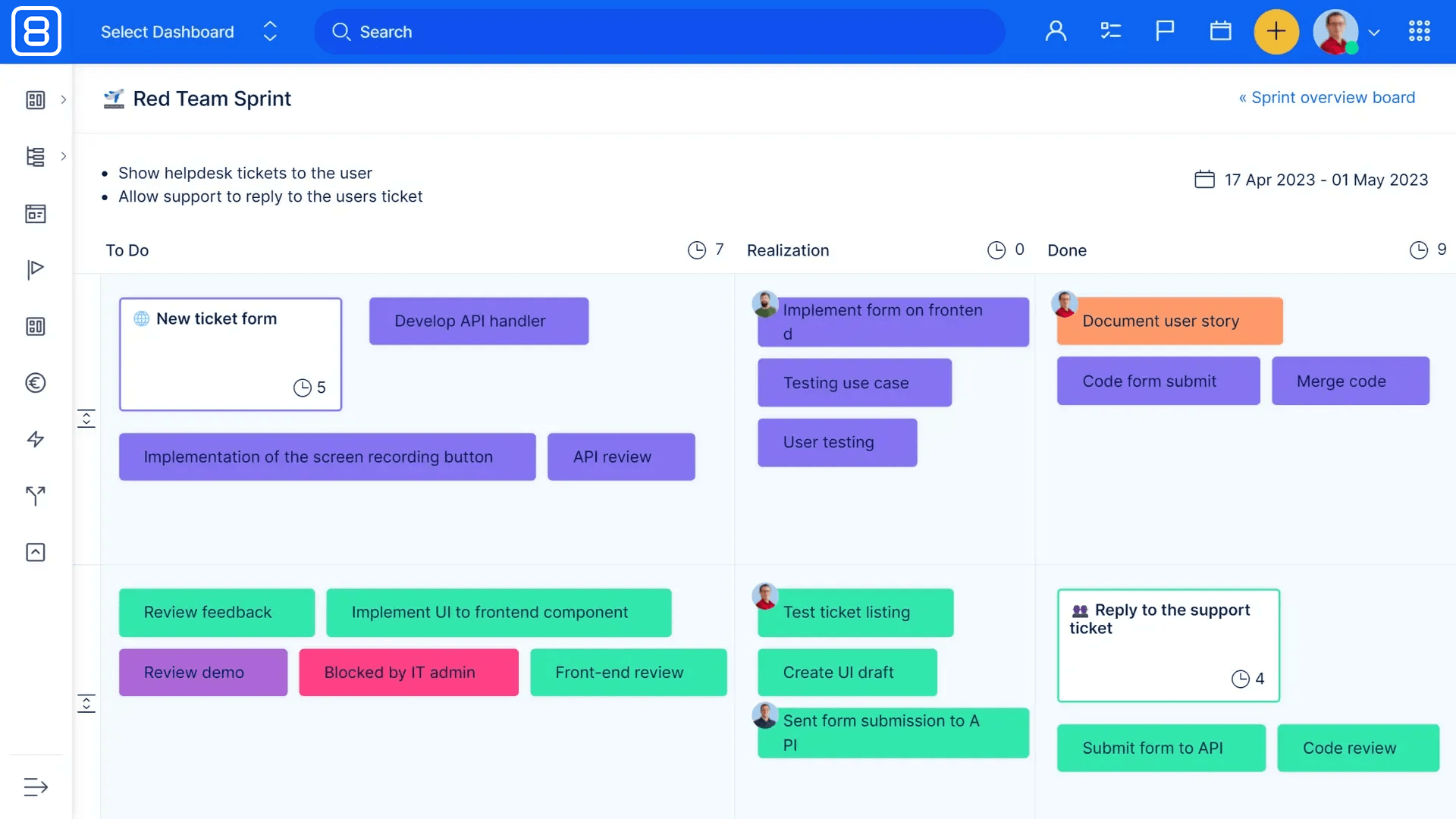
Scrum Boards in Easy8
Jira alternative with on-premises support
Jira may be a powerful tool, but for many mid-sized organisations, it’s becoming too complex, costly, and rigid — especially with Atlassian phasing out Data Center and pushing users toward its cloud.
With Data Center going read-only by March 2029, now is the time to explore alternatives that offer stability, flexibility, and full on-premises support. Easy8 has already helped many clients migrate from Jira successfully — and it could be the right next step for your team too. Contact our sales team to discuss the ideal scenario for your company!

Frequently asked questions
How to migrate Jira database?
Migrating from Jira to another platform can be a complex process, and it typically involves several key steps:
- Assessment and planning: Before starting the migration, it's crucial to assess the current Jira setup, including the number of projects, custom fields, workflows, and any integrations or add-ons in use. This helps in planning the migration strategy and identifying potential challenges.
- Data export: The next step is to export data from Jira. This can be done using Jira's built-in export tools, such as exporting issues to a CSV file. The export should include all necessary data like issues, attachments, and user information.
- Data mapping and transformation: Once the data is exported, it needs to be mapped to the new platform's data structure. This may involve transforming the data to fit the new system's requirements, such as converting custom fields or workflows to the new format.
- Migration tools: Depending on the target platform, there may be specific migration tools available to facilitate the process. For example, if migrating to a cloud-based system, there might be cloud migration assistants or third-party tools that can help automate parts of the migration.
- Testing: Before performing the final migration, it's important to test the process in a staging environment. This helps identify any issues that might arise during the actual migration and allows for adjustments to be made.
- Execution: After successful testing, the migration can be executed. This involves importing the transformed data into the new platform and ensuring that all data is correctly mapped and accessible.
- Validation and cleanup: Post-migration, it's essential to validate that all data has been migrated correctly and that the new system is functioning as expected. This includes checking for any missing data, broken links, or issues with workflows. Any necessary cleanup should be performed at this stage.
- Training and support: Finally, provide training and support to users to help them transition to the new platform. This ensures that they are comfortable with the new system and can use it effectively.
Each migration is unique, and the specific steps may vary depending on the complexity of the Jira setup and the target platform. It's often recommended to work with experienced professionals or solution partners to ensure a smooth migration process.
What is the best Jira alternative?
Many teams seek alternatives due to Jira's complexity, cost, or specific feature needs. Several tools offer compelling options, each with unique strengths suited for different kinds of teams and workflows. Among them is Easy8, which provides open source solutions to 25+ team members.
Organizations considering switching from Jira may find Easy8 particularly appealing due to its hybrid project management capabilities, extensive feature set, greater data control, and lower operational costs—all crucial factors for modern, security-conscious, and cost-sensitive teams.
What is the difference between Jira and Redmine?
Jira is a proprietary, enterprise-grade issue tracking and agile project management platform developed by Atlassian, featuring built-in Scrum and Kanban boards, advanced reporting, and seamless integration with the wider Atlassian ecosystem under commercial licensing.
Redmine is a free, open-source, Ruby on Rails–based project management and issue-tracking tool emphasizing self-hosting flexibility, hierarchical projects, built-in Gantt charts and calendars, and extensibility through community-driven plugins.
As a result, organizations seeking polished UX, enterprise support, and rich analytics tend to choose Jira despite licensing costs, while teams prioritizing customizability, budget-friendliness, and open-source control often opt for Redmine.
Related articles

The end of Jira on-premises: Atlassian Data Center terminates support
Atlassian is discontinuing Jira Data Center, and with it, the last on-premises option for Jira users. By 2029, support and updates will be gone entirely. The countdown has started: migrate to the cloud, plan a hybrid setup, or find a true on-premises alternative before the clock runs out. The first phase ended in March 2026.

Easy8 (formerly Easy Redmine) vs. Jira: A comparison of project management software
Still not sure if Jira is the right fit for your projects? Read this comparison to discover why more and more teams are switching to Easy8, and why it could save you time, money and frustration.

Less expensive alternative for Jira on-premises
Jira Server was discontinued in 2024 and Jira Data Center is now on a fixed countdown: new customers can no longer buy it, and every instance goes read-only in 2029. If you run Jira on your own servers, the question is what each option costs you – and whether a less expensive on-premises alternative fits your team.
