


How to migrate data from Jira to Easy8: Step-by-step guide
In Easy8, we understand the challenges and risks that companies face during migration. That’s why we provide Jira core data migration as part of the platform transition from Jira to Easy8. In the following article, we will explain the whole process, so you know exactly what to expect.

Table of contents
Why migrate from Jira?
Jira migration in three steps
1. Enumerations migration
2. Interim configuration and customization
3. Data import
User testing: Jira data migration check
Jira migration experts
Start your Jira software migration with Easy8 support
TL;DR
Migrating from Jira to Easy8 follows three steps:
- Enumerations migration – analyse your data structure and import core elements (statuses, priorities, trackers, roles)
- Configuration & customisation – align settings between systems and set up user profiles, workflows, and dashboards
- Data import – migrate users, projects, tasks, and time logs (with test runs before production)
After migration, user testing ensures everything works as expected, with Easy8 consultants fine-tuning based on feedback.
Why migrate from Jira?
Companies often migrate from Jira due to its complexity, high maintenance requirements, and rising costs. This complexity can lead to inefficiencies and frustration among Jira users who feel bogged down by unnecessary processes. Additionally, without proper administration, Jira setups can become inconsistent across an organization, further complicating its use.
The common issues related to Jira are:
1. Complexity and customisation issues: Over-customisation creates cluttered workflows that slow teams down. Inconsistent Jira setups across departments cause confusion and inefficiencies.
2. High maintenance and cost: Jira requires constant upkeep by dedicated admins to stay usable. Costs are rising, making it less attractive for budget-conscious teams.
3. Alternatives and migration considerations: Other project management softwares offer simpler, cheaper alternatives. Migrating from Jira takes effort and budget, often needing detailed planning.
4. Cultural and process challenges: Jira can support bad habits like backlog overload or poor tracking. Tool changes alone don’t help unless internal project processes also improve.
Actually, Jira migration can be done without stress - watch the recorded webinar demonstration on 'How to migrate data from Jira Software'.
Jira migration in three steps
Before initiating any migration, backing up your existing Jira instance is crucial to safeguard against data loss. Given the complexity of Jira migrations, professional assistance might be necessary, especially for large-scale or highly customized setups.
The Jira to Easy8 migration process is divided into three parts:
1. Enumerations migration
First, we meet with your organization representative and check the data structure and volumes of data to be migrated. We will estimate the duration of the entire operation and map your requirements using our special implementation protocol.
Then we handle the .ZIP Jira export file supplied by the customer and import the fundamental enumerations. In the initial phase, we compile lists of statuses, priorities, trackers, groups, roles, and issues.
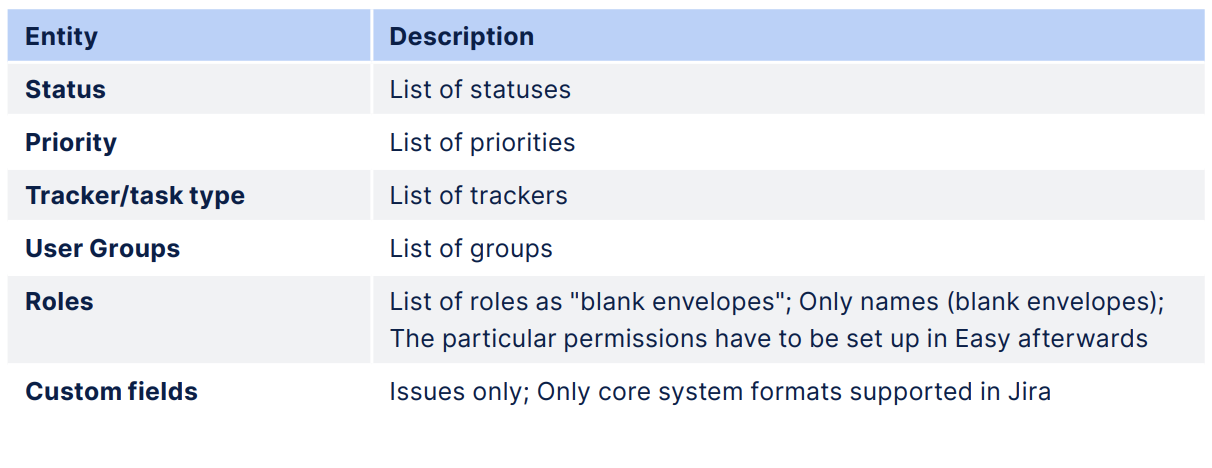
Jira export file process provided by customer and import of enumerations
2. Interim configuration and customization
In this phase, we align the primary enumerations (e.g. Task Statuses, Types, Priorities, etc.) between the two systems and adjust the elements that cannot be smoothly migrated due to their differing nature (such as Workflow, Role permissions, etc.). Additionally, we offer customization services and configure user profiles, filters, and dashboards as required.
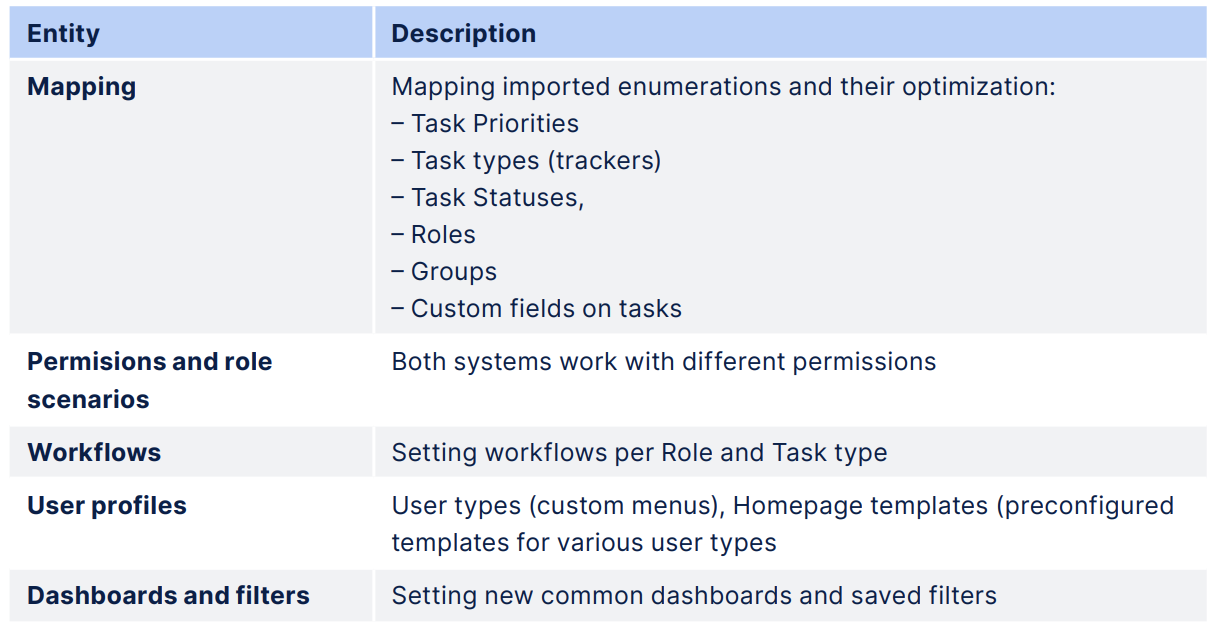
Map of Interim configuration and customization
3. Data import
After the customer has preconfigured, customized, and tested the system, we can proceed with migrating data such as users, projects, tasks, spent time, etc. This process can be repeated if necessary, starting with a test data migration. After presenting the results, we will migrate the production data and activate user accounts.
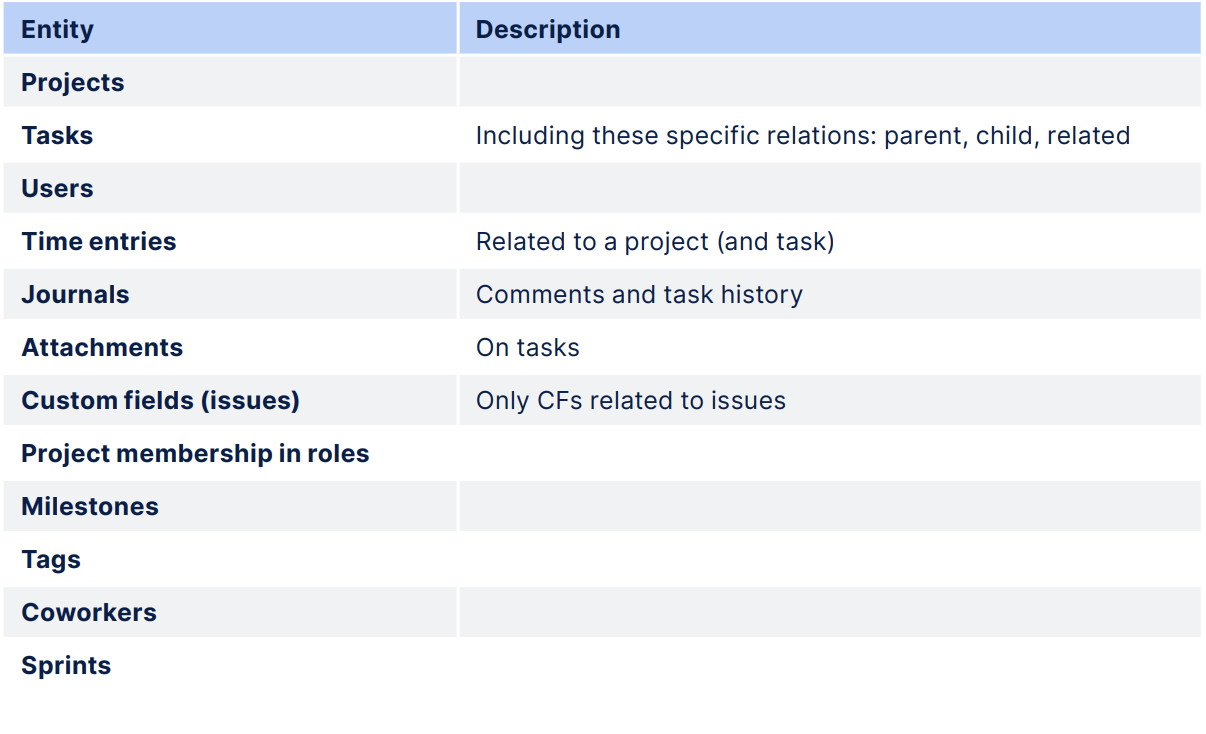
Data migration step
User testing: Jira data migration check
When the migration is completed, thorough user testing comes into place. Conducting thorough testing post-migration ensures that all functionalities work as expected and that no critical data is missing or corrupted.
The customer starts to work in his customized environment, with actual data, and provides feedback on whether everything works as he is used to.
If it doesn’t, the feedback is gradually incorporated into the system settings by our consultants to make sure everything is well-tuned and ready to work!
Jira migration experts
Professional Easy Software consultants provide personalized assistance to organizations during their migration from Jira to Easy8. The consultant will work closely with the organization to understand their specific needs and requirements, as well as their current Jira setup.
During the process, the consultant will provide hands-on support and guidance to ensure a smooth and seamless transition to Easy8. They will help with tasks such as data migration, customization, configuration, and training to ensure that the organization is able to fully utilize all of the features and benefits of Easy8.
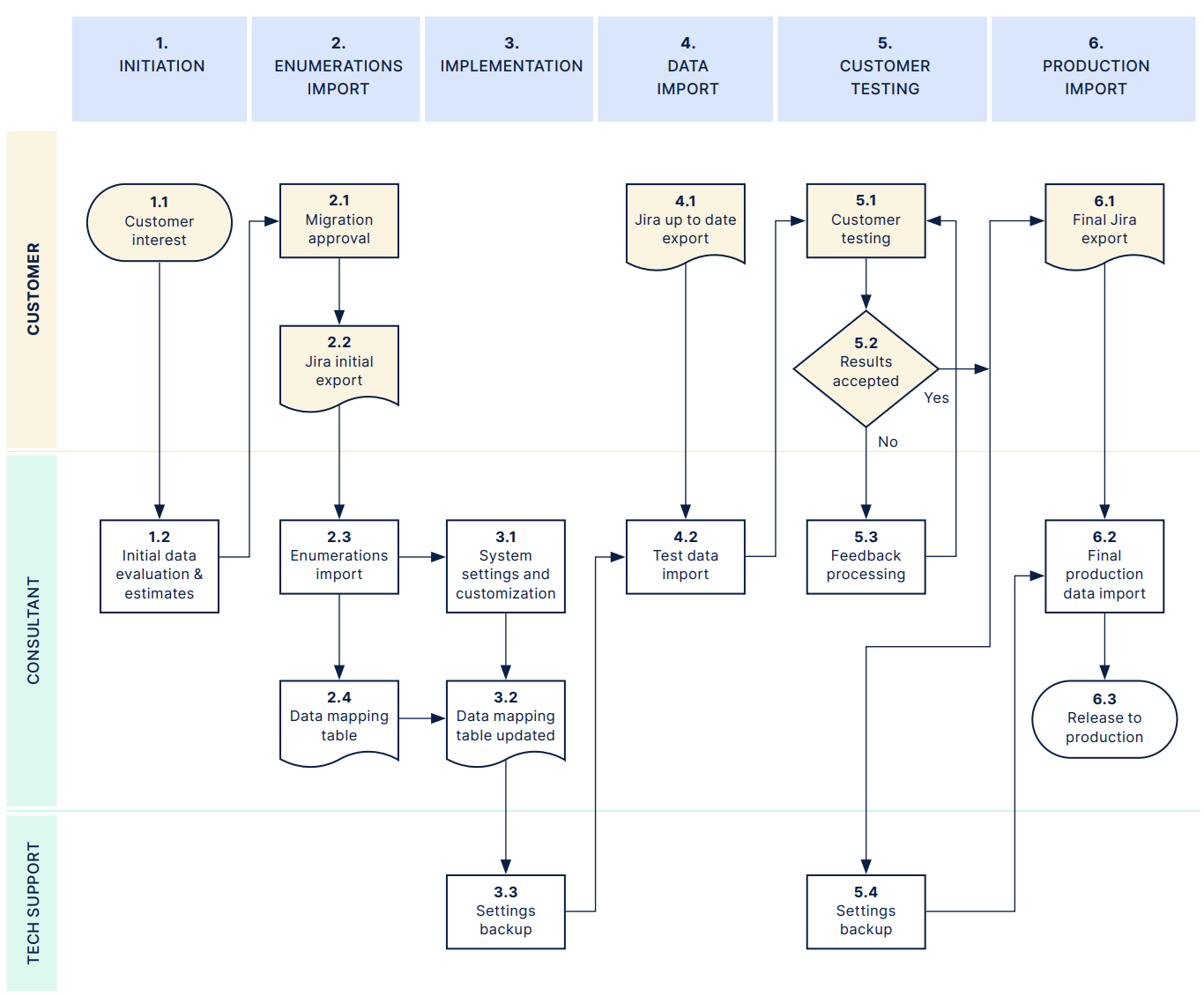
Map of migration process
Start your Jira software migration with Easy8 support
If you're considering a migration, we encourage you to reach out to Easy8 support and ask us everything you want to know about the process. Our goal is to provide you with the information and support you need to make an informed decision and achieve a successful outcome.
Still hesitating? Let us demonstrate our expertise in Jira migration through this case study!
Migrate from Jira with confidence – contact Easy8 support!

The ultimate Jira alternative? Easy.
Get all powerful tools for perfect project planning, management, and control in one software.

Frequently asked questions
What are the best practices for migrating from Jira to Easy8?
Jira data migration is performed using the Jira Migrator that takes Jira Software data and imports it to Easy8. The full migration service includes data import, mappings, clean-up assistance, and additional configuration.
Companies can choose between two migration scope approaches:
- Full migration: Recommended for smaller companies capable of executing a single "big bang" migration. Mostly limited by time.
- Partial migration: Recommended for larger companies that prefer a phased, project-by-project approach.
How to migrate Jira database?
Migrating from Jira to another platform can be a complex process, and it typically involves several key steps:
- Assessment and planning: Before starting the migration, it's crucial to assess the current Jira setup, including the number of projects, custom fields, workflows, and any integrations or add-ons in use. This helps in planning the migration strategy and identifying potential challenges.
- Data export: The next step is to export data from Jira. This can be done using Jira's built-in export tools, such as exporting issues to a CSV file. The export should include all necessary data like issues, attachments, and user information.
- Data mapping and transformation: Once the data is exported, it needs to be mapped to the new platform's data structure. This may involve transforming the data to fit the new system's requirements, such as converting custom fields or workflows to the new format.
- Migration tools: Depending on the target platform, there may be specific migration tools available to facilitate the process. For example, if migrating to a cloud-based system, there might be cloud migration assistants or third-party tools that can help automate parts of the migration.
- Testing: Before performing the final migration, it's important to test the process in a staging environment. This helps identify any issues that might arise during the actual migration and allows for adjustments to be made.
- Execution: After successful testing, the migration can be executed. This involves importing the transformed data into the new platform and ensuring that all data is correctly mapped and accessible.
- Validation and cleanup: Post-migration, it's essential to validate that all data has been migrated correctly and that the new system is functioning as expected. This includes checking for any missing data, broken links, or issues with workflows. Any necessary cleanup should be performed at this stage.
- Training and support: Finally, provide training and support to users to help them transition to the new platform. This ensures that they are comfortable with the new system and can use it effectively.
Each migration is unique, and the specific steps may vary depending on the complexity of the Jira setup and the target platform. It's often recommended to work with experienced professionals or solution partners to ensure a smooth migration process.
What are the disadvantages of using Jira?
Jira’s flexibility and depth come with a steep learning curve and significant administrative overhead, as teams must master complex configurations and dedicate resources to ongoing maintenance. Large instances can suffer performance bottlenecks and require disruptive re-indexing, while licensing and add-on costs quickly escalate.
Over-customisation risks process fragmentation and upgrade headaches, and native reporting tools are limited without additional plugins or BI integrations. Finally, the crowded UI and integration complexity can hinder adoption and create data silos if not carefully managed.
Related articles

Top 5 open source Jira alternatives
Jira’s rising costs, forced cloud shift, and clunky performance are pushing more teams to ask a simple question: isn’t there a better way to run projects? In this guide, we’ll walk through five open-source Jira alternatives that give you predictable pricing, on-premises options, and the flexibility to model complex workflows.

Easy8 (formerly Easy Redmine) vs. Jira: A comparison of project management software
Still not sure if Jira is the right fit for your projects? Read this comparison to discover why more and more teams are switching to Easy8, and why it could save you time, money and frustration.

Recorded webinar: How to migrate data from Jira to Easy8
Taking into account Atlassian's recent decision to cease Server support for Jira, this webinar is designed to provide crucial insights for a seamless transition. Our experts showcased a live demonstration of real data migration, offering valuable insights to ensure a smooth and effective transition for your team.
