


Table of contents
Easy8: New version, new fresh design, smoother experience
Aura: Your everyday Easy8 work companion
Tell or ask Aura what you need, in your own words
Aura keeps your data under your control
Aura now included in the Business and Platform Plan
Request Launcher: Your go-to request hub
App performance boost
Easy8 MCP: New tools for HelpDesk, CRM and even more
Explore data sovereignty: Register for the upcoming webinars
Easy8: New version, new fresh design, smoother experience
The new version of the Easy8 application has been improved and refreshed to help you streamline your operations, processes and work delivery.
You will be welcomed by the new colours, logo and font. However, there is no need to worry about the completely new design of the application. The main menu has been improved in the app to make it easier to find the feature you want to work with. The menu items are where you expect them, and you get to your work faster.
Easy8's new refreshed interface brings an improved main menu that can be found in the top right-hand corner and is sorted by related functionalities. Also, the menu works better on small screens.
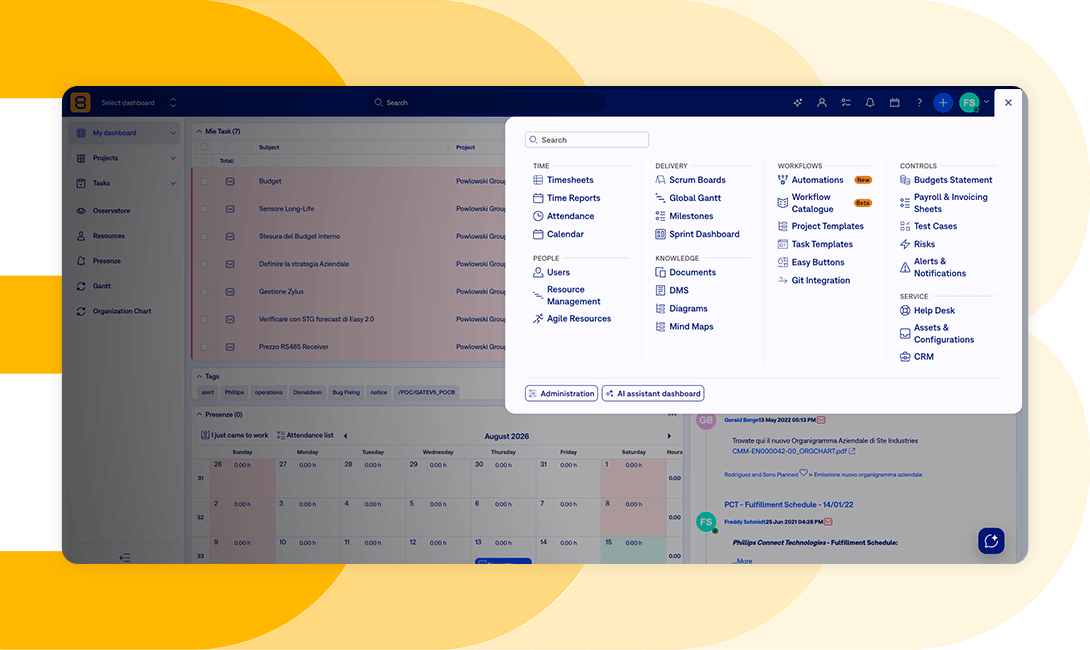
Improved main menu in the new version of the Easy8 app
Aura: Your everyday Easy8 work companion
Aura is an AI agent that works as a natural-language work companion. Instead of clicking through lists, filters, and modules, you describe what you need, and Aura does it for you. Aura is your virtual AI colleague, the natural evolution of Easy AI. You can use Aura to write questions, create tasks and plan projects, as well as generate weekly summaries and much more besides.
It searches, reads, updates and creates tasks, time entries, projects, activities, milestones and accounts, all inside one conversation. All this is happening in the secure setup, as Easy8 is a Private WorkOps Platform.
The market has rapidly shifted from isolated AI functions to fully autonomous assistants controlled by natural language. The chat-agent coverage across Project Management SaaS was something we couldn't ignore. Aura is the answer to the need to coordinate multi‑system workflows and become the central nervous system of teams.
Tell or ask Aura what you need, in your own words
Think of Aura as your AI work companion. It's similar to Claude or ChatGPT, but it's locked in the private environment of the Easy8 WorkOps Platform. It is an AI layer that seeks and gathers real-time information from across the entire Easy8 ecosystem and the Knowledge Base (if activated).
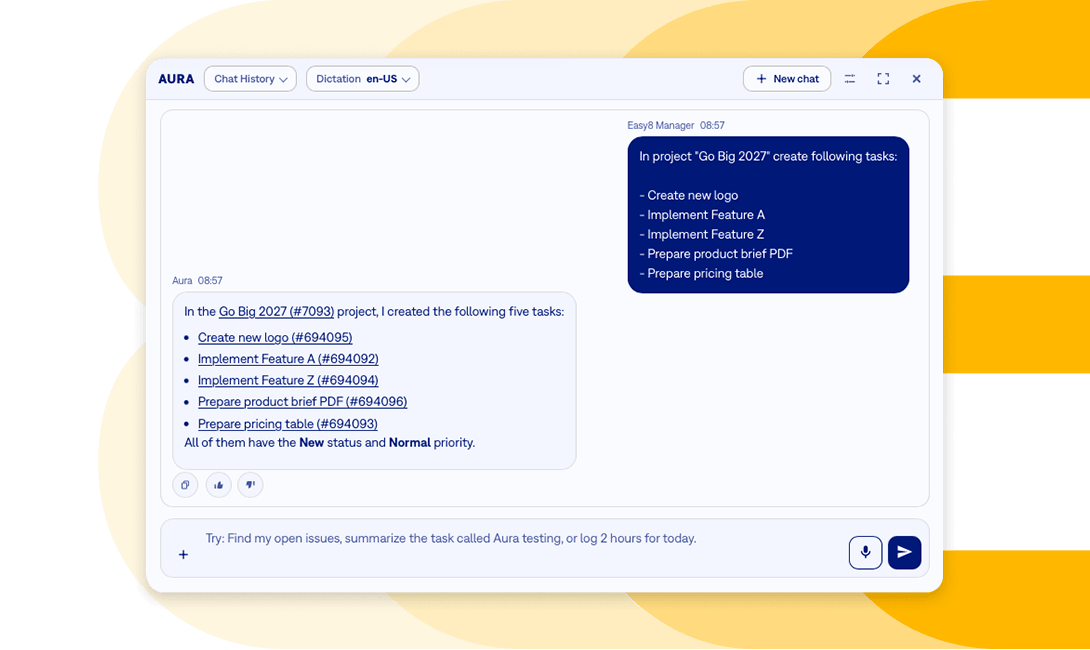
Aura, the AI companion, in the Easy8 app
Basically, you tell Aura what you need in your own words in the Easy8 interface, and this AI agent will perform the required action or response immediately.
Benefits of Aura:
- fewer clicks in the Easy8 app, speeding up your work
- natural language processing
- tasks can be completed directly in the chat
- working with up-to-date Easy8 data
- consolidating AI functions into a single assistant
Aura keeps your data under your control
Easy8 has always been the Private WorkOps Platform, ISO 27001 certified and available with EU data residency. Aura had to be built to that same standard.
Where your data goes from Aura:
- Easy8: Aura chats and related conversation data stay in Easy8. Access follows your Easy8 permissions and visibility settings.
- Azure AI: Language processing and response generation run in Azure AI and Azure OpenAI. Aura passes only the context needed for the specific answer, such as your question and the relevant Easy8 results.
- Knowledge sources: Where an indexed source is connected, Aura can search documentation, websites, Confluence (or Knowledge Base if you have it activated), indexed tasks, or knowledge databases. That search stays limited to the sources available in the given AI chain.
For a deeper look at how Aura works, how security is handled, and what this means in practice, read the full article on our blog.
Aura now included in the Business and Platform Plan
Aura, the evolution of Easy AI, is now available for all Business and Platform Plan customers after request for the early access activation.
Until now, Easy AI came in the form of separate AI Assistants: Write Assistant, Knowledge Assistant, AI Task Summary, AI Project Status, AI Project Planner, and HelpDesk Assistant. Aura brings them together into a single agent, providing a centralised location for all your queries and conversations. The existing AI Assistants will continue to work during the transition, with Aura gradually becoming the main entry point for AI in Easy8.
Aura is the next stage of Easy AI: an agentic assistance approach. Clients with Easy AI automatically have Aura included in their plan. We need you to request early access in order to integrate Aura into your Easy8 app. If you have Easy AI activated, you have on-demand access to Aura. All you need to do is click the button below and fill in the form.
Clients who have Easy AI activated have Aura automatically included in their Plan. Aura is the next stage of Easy AI, the agentic approach to assistance, and we need you to request early access to roll Aura into your Easy8 app.
Basically, if you have Easy AI activated, you have on-request access to Aura. All you need to do is click on the button below and fill in the form.
Request Launcher: Your go-to request hub
Meet Request Launcher, a central location for selecting and creating requests from IT, HR, Finance, and other teams. It replaces vague emails and phone calls with a single, known destination.
The Request Launcher is a hub that will primarily serve the Helpdesk by providing a clearer overview and improving the user experience. It is an organisation-wide input point for raising requests conveniently. Every request becomes a trackable task, which helps enforce policy consistently and maintains a clean audit trail of who requested what and who approved it.
Requests can be set up in a modal window where users can fill in the issue directly from the template without leaving the dashboard.
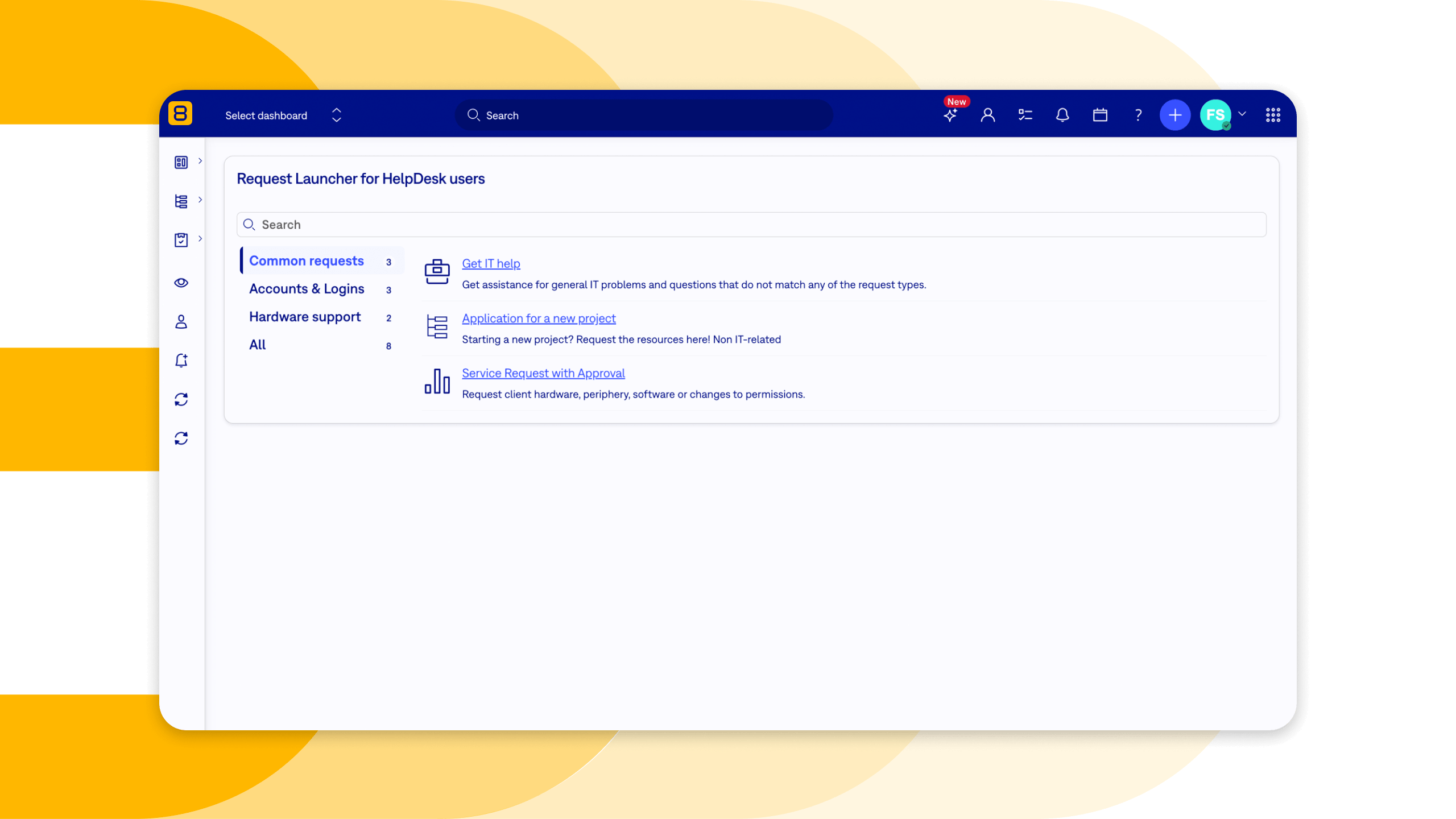
The Request Launcher in the Easy8 app
Build the launcher once, then drop it wherever your teams work. These are the two pieces that make that possible:
- Request Launcher: The configuration itself (groups, cards, targets). An admin can create several, for different audiences or purposes.
- Request Launcher widget: What you place on a dashboard. You select an existing launcher, save, and the widget renders it.
What Request Launcher, smarter service portal, brings:
- Centralized, self-service experience: An employee requesting paternity leave from HR, new hardware from IT, an ergonomic workstation from Facilities, or a vendor procurement — it's all the same portal, same pattern. Users don't need to remember who to contact; they only need to remember where to go, then find what they need.
- Clear SLAs and expectations: Every catalog item can be mapped to a defined performance metric and delivery timeline, so users get a realistic expectation of when their request will actually be fulfilled.
- Better governance, compliance, and auditability: Centralizing requests into one trackable place gives the organization real oversight into what services it actually provides to employees and clients. It helps prevent "shadow IT".
Benefits of Request Launcher:
- Less admin work
- More intuitive way to set the request
App performance boost
Easy8 is now faster and more responsive. Over the past six months, average response time has dropped by 29.6%, from 540 ms to 380 ms. The app now responds 1.42 times faster. This brings fewer interruptions, less waiting, and context switching.
This is where the benefit of speed becomes apparent:
- Dashboards and the homepage load sooner
- "My tasks" opens faster
- Project task lists respond faster
- Scrum boards feel more responsive
- Saved filters and custom queries load faster
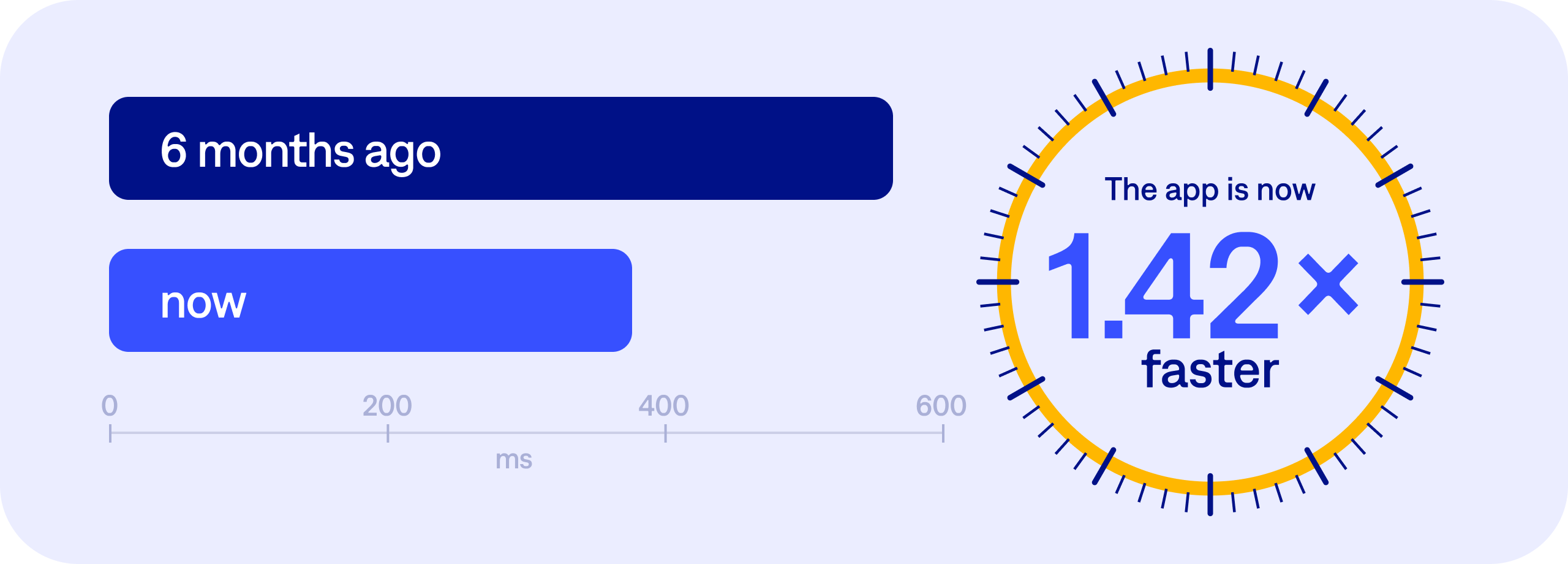
The Easy8 app is now noticeably snappier
Easy8 MCP: New tools for HelpDesk, CRM and even more
In the May 2026 product news, we introduced the Easy8 MCP Server, which lets MCP-compatible AI tools and AI agents talk to Easy8 directly. Now we are expanding what those agents can do.
The MCP Server now exposes plugin tools: extra capabilities that come from specific Easy8 plugins. Each one shows up for your AI agent only when the matching plugin is active in your Easy8. This batch covers four core areas: Helpdesk, Attendance, CRM, and Money.
To use them, you need the Easy8 MCP Server enabled on your instance and the matching plugin (Helpdesk, Attendance, CRM, or Money) active. Your admin can confirm both.
What you can do with the MCP connection:
- HelpDesk: explore support and SLA data such as project settings, active SLA events on a given issue, and the mail templates that fire on escalation (check them before a breach, not after).
- Attendance: shows the attendance, lists absence/activity types, or review approval requests. A user without rights to see others only ever sees their own records.
- CRM: review active opportunities, find cases assigned to a person, or list case statuses; agents only surface what the user is authorised to see.
- Money: read a project's financial summary, expected/other revenues and expenses, without touching the budget.
All of the new tools are read-only and respect your existing Easy8 permissions. An agent sees exactly what the user behind it is allowed to see, nothing more.
Explore data sovereignity: Register for the upcoming webinars
Explore the increasing challenges of data leakage and data sovereignty. For regulated industries, the U.S. CLOUD Act can create additional jurisdictional and compliance risks, making informed decisions about cloud providers, data location, and access controls essential.
When your data stays under your control, you can protect sensitive information and intellectual property without relying on a vendor's next policy change.
Across four sessions, our experts explore what on-premises, air-gapped and managed-server deployment mean in practice. Learn how each option affects security, AI use, data control and your move away from Jira, so you can choose the deployment approach that fits your organisation.
Register for the webinars that will answer all the questions you might have been asking yourself in terms of data sovereignty, security, deployment, and AI governance:
- 17.09.2026 at 14:00 (CEST): The Project Management stack of 2026: How to build a context layer for AI without losing control
- 08.10.2026 at 14:00 (CEST): Good AI vs. Bad AI: How to use AI in your company without giving away your competitive edge
- 29.10.2026 at 14:00 (CET): Different shades of on-premises: Air-gapped, self-hosted, and managed server explained
- 19.11.2026 at 14:00 (CET): How teams migrate from Jira server or data center efficiently using a proven step-by-step process
For more technical details, see the latest Release notes for version: 16.0.0
