


Release notes for version: 16.0.0
Contents
Visual identity
Global menu redesign
Request launcher
Aura - context-driven AI assistant in Easy8
Automation improvements
Gantt - presentation mode
Budgets — rates with validity periods
Unified login page (internal and Help Desk users)
Project scrum - Sprint backlog items from multiple projects
Assets and configurations improvements
Status timeline adjustments
Redesigned SSO configuration
Performance optimisation
Accessibility improvements
Legacy repository connection removed
Project calendar module removed
Technological stack and changes
New visual identity
This release carries the new Easy8 brand across the product: the updated colour palette and fonts on login, forms, buttons, navigation, Automations, e-mails, print templates and related surfaces.
New Design System components
These are building blocks for upcoming screens. Adopting them is what makes the product visually consistent, so some of them have no immediate effect on existing pages.
- Menu, with nested items, separators, icons, prefix and suffix content, and container-driven width
- Card with structured headers — icon, subtitle, suffix content, actions — and optional collapsible content
- Avatar and user components, URL input, slider input, tooltip directive plus tooltip support across existing components
- Divider, resize handle, page columns layout with persisted relative widths
- Sortable and drag handle components, replacing the previous third-party sorting patterns
- Emoji picker with search, categories, recent choices, skin tones and reaction counts
- Image thumbnail with a full-size dialog and keyboard activation, palette item, comment bubble
- Badge — new accent state for labels such as "New", and an extra-large size
- Icon picker — clearable, with validation rules
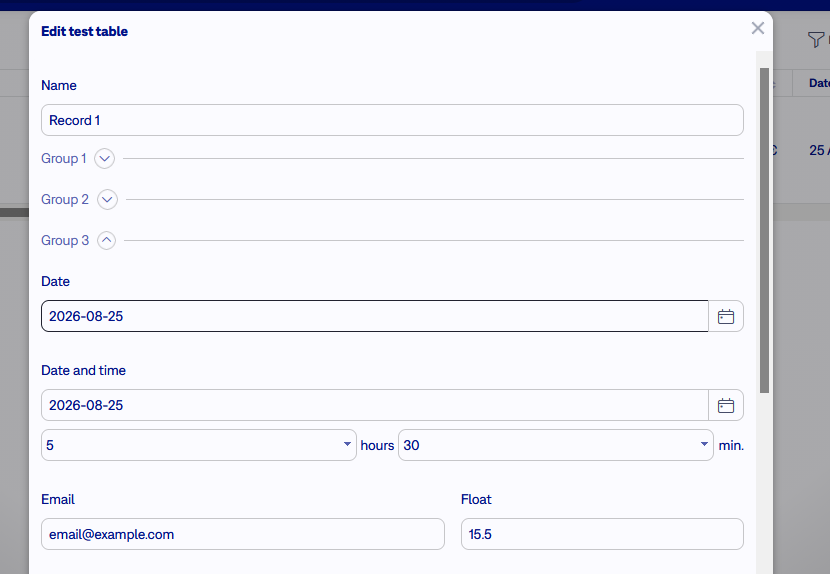
- Collapsible fieldsets, so long forms can be grouped into sections
-
New
crossroadicon in filled and outlined styles
Other visual fixes: Design System pages embedded in the Easy content frame regained their outer spacing, the datepicker month selector uses a cleaner centred grid, dropdown items in the task modal highlight correctly on hover, labels no longer flicker while being clicked, and the error pages (payment, not found, gone, server error) have a redesigned background.
Global menu redesign
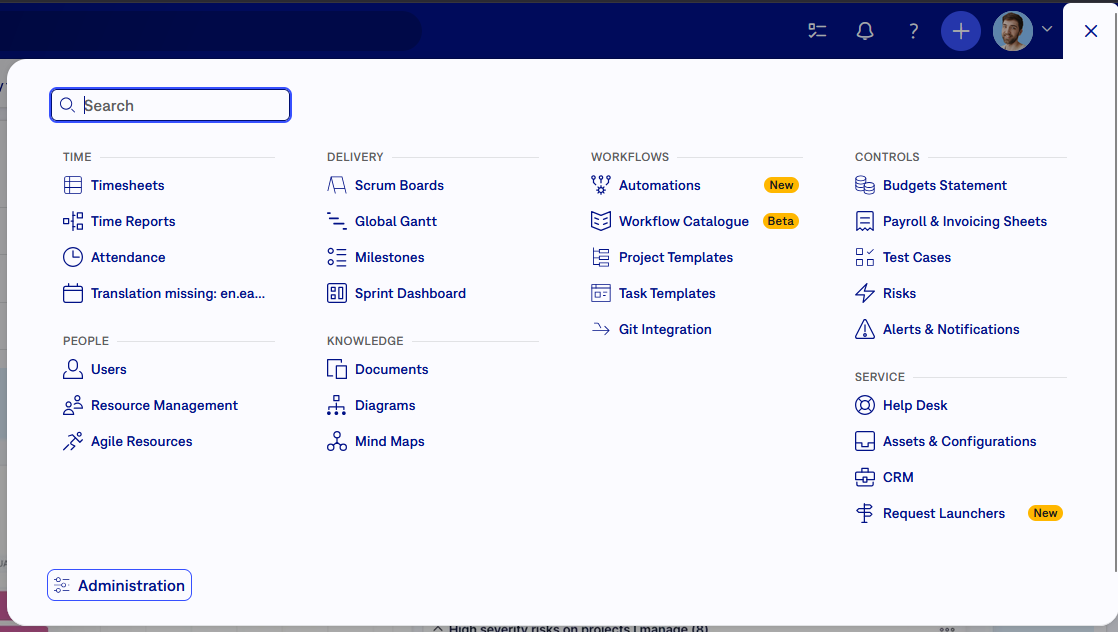
The global menu was fully redesigned: grouped navigation, search, Design System icons, footer actions, loading feedback and better mobile access. Menu entries are easier to scan with responsive columns, size-appropriate text and clearer section labels.
Request Launcher
A new, more graphical way of entering requests by your clients or internal users. Instead of a flat list of links, requesters get grouped cards with icons, titles and descriptions.
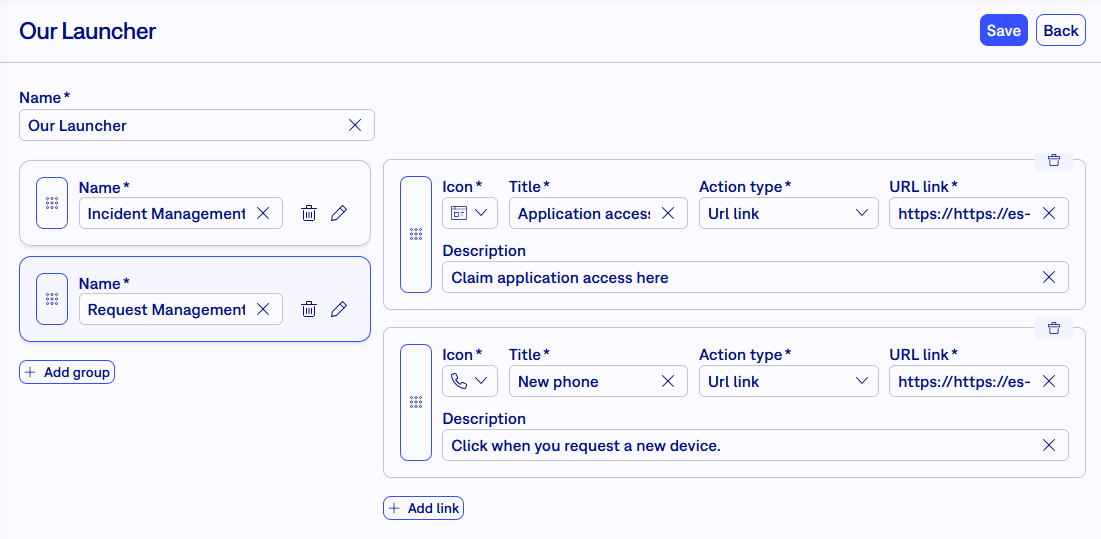
- Groups and request cards - build an ordered structure of groups, each containing request cards configured with icon, title, description and action. Group counts are shown as badges.
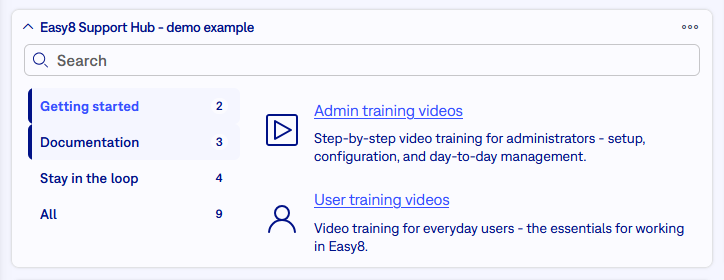
- Dashboard widget - a graphical, searchable Request Launcher widget for portal and request entry pages, with an admin preview and a direct link to launcher management from the widget settings.
- Help Desk portal integration - clicking a request option opens a prefilled Help Desk ticket form in a modal without leaving the portal.
- Overview dashboard - a permission-gated Request Launcher overview reachable from the global menu, with onboarding content. New installations also get a demo "Easy8 Support Hub" launcher linking to training videos, documentation, product news, feedback and community resources.
- Author permissions — regular users can create and manage their own Request Launchers from My dashboard without broader admin rights. Global launchers and other users' launchers stay protected for users with full launcher management permission.
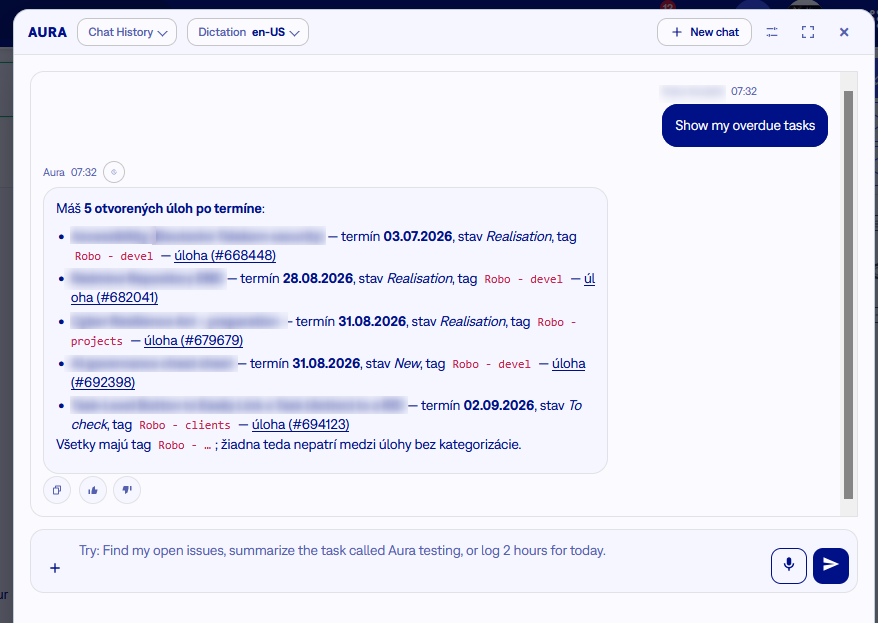
Aura - context-driven AI assistant in Easy8
Next generation AI assistant working directly with application data and voice controlled to serve and process information tailored to your humanly defined request.
The feature is deactivated by default. In the first months, it will be activated with explicit consent with the application owner. If you are interested, ask your account manager or support.
Detailed documentation: https://www.easy8.com/documentation-of-easy-redmine/article/aura-ai-assistant-in-easy8
Automation improvements
- Secure webhook payload - It is possible to send webhook context as a signed JWT, reducing accidental payload tampering risk for integrations that validate the shared secret.
- Dynamic tokens in e-mails subject, sender and recipient.
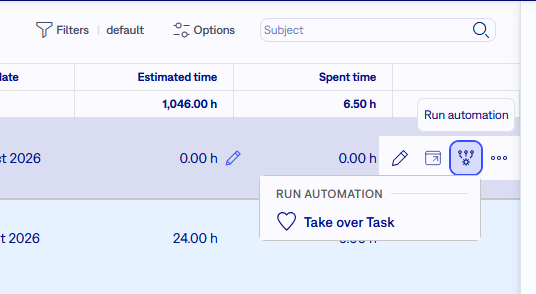
- Automation button on task can be triggered from the task list. Added in the menu on the right, when hovering on task list.
Gantt - presentation mode
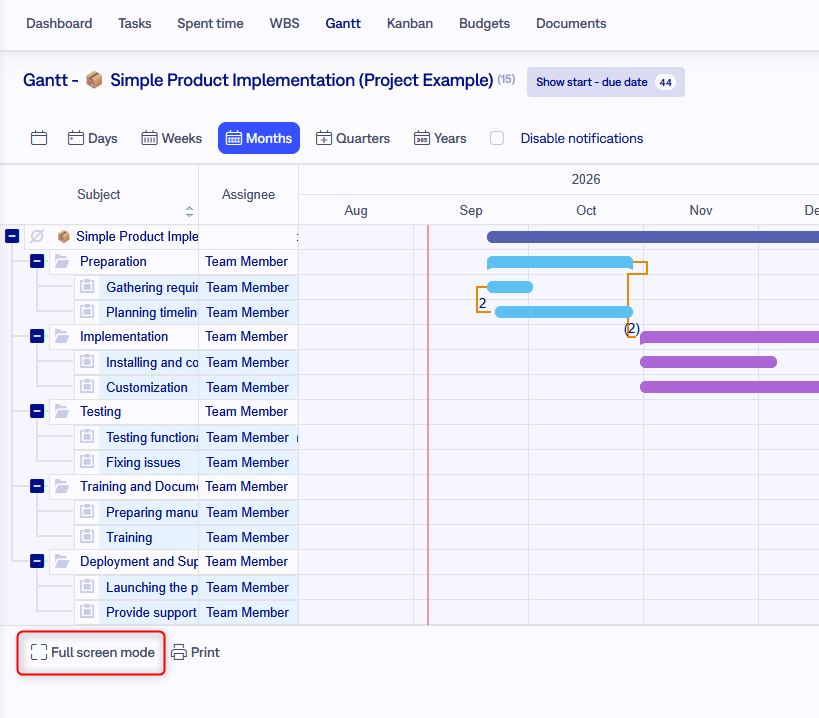
You can open Gantt in a dedicated presentation window that shows only the chart-focused interface, reducing the chance of exposing unrelated application data during meetings.
Budgets — rates with validity periods
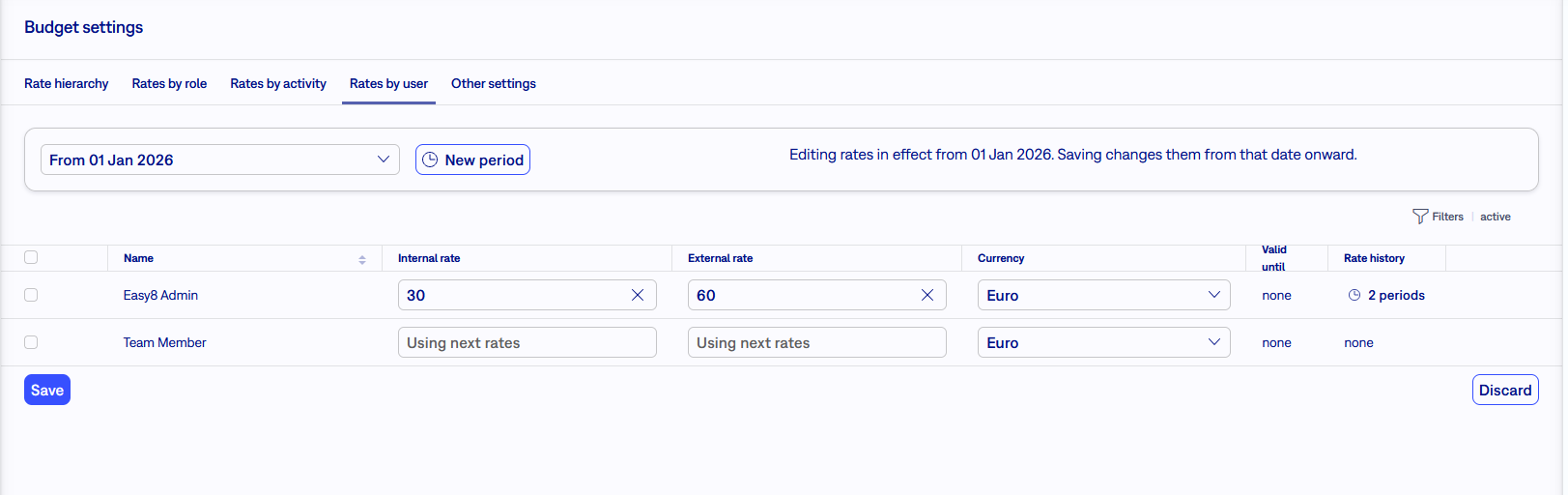
Rates can now be set with a defined validity period, so a future rate change — a yearly inflation adjustment, a new contractual price — no longer rewrites historical budgets and reporting.
- Set rates per period for roles, activities and users, including scheduled future rates
- Rate grids show period and history information; a history view lists valid-from / valid-until rows
- Time-entry expenses resolve the rate that was valid on the entry's spent-on date
For integrations:
the rate endpoints are now period-aware. An omitted
valid_from
writes the base "since always" period, and invalid dates are rejected, so
integrations updating a current or future rate must send the intended period
explicitly.
Unified login page (internal and Help Desk users)
Help Desk users no longer have a separate login page. The main
/login
page authenticates both platform users and Help Desk users, and the legacy
Help Desk login page /helpdesk/login redirects there.
- LDAP, SSO, two-factor authentication and lost-password flows are preserved for Help Desk users
- Help Desk portal and platform return URLs are kept apart, and functionally remain separate
- New validations prevent e-mail and login collisions between internal users and Help Desk users, so a single shared login page stays deterministic
Please check before upgrading whether your instance already has overlapping internal and Help Desk identities, and whether anything still posts credentials to the old Help Desk login path.
Project scrum - Sprint backlog items from multiple projects
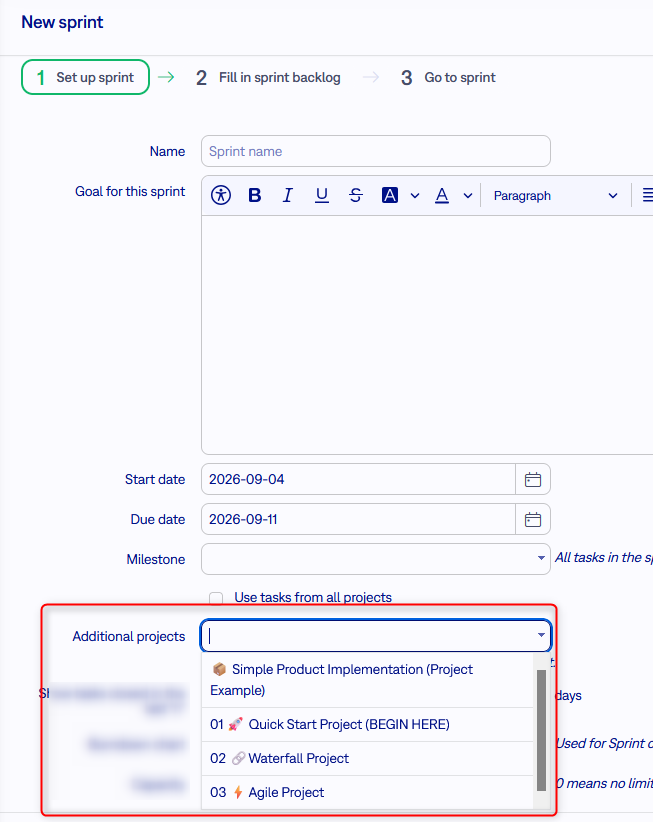
In legacy Scrum (project module), you can select specific projects which tasks can be added to the sprint. The setting in on sprint level.
Assets and configurations improvements
- Custom field groups are now also available for assets and configurations. The existing group management for custom fields is used.
- Cascading fields - a custom table field can depend on a parent field, so later choices are narrowed by earlier ones: pick a printer, then only that printer's vendors and models are offered. Changing the parent clears and reloads the child. This also works for fields exposed in the Help Desk portal, so requesters only see relevant asset options.
Status timeline adjustments
Administrators can disable the status timeline on task type level.
Also, timelines show only the last 12 months history, to avoid performance issues in loading long lasting tasks.
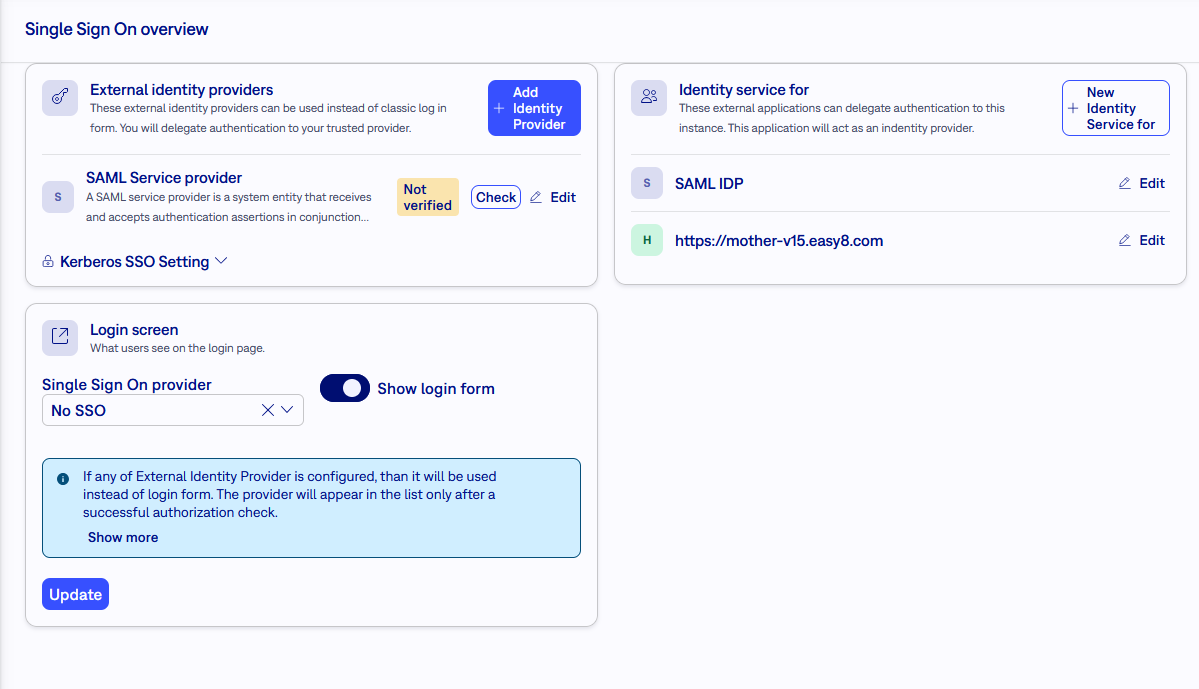
Redesigned SSO configuration
Performance optimisation
- Permission derivation — user and project are denormalized onto member roles, which speeds up task detail, edit, list, dashboard and API requests that repeatedly derive project permissions. Version, descendant, spent-time, workflow-rule, calendar and mail-notification paths benefit as well.
- Custom fields — filtering, sums, grouping, sorting and autoincrement allocation read typed generated columns instead of coercing text values
- Issue lists and dashboards — index-friendly open/closed filtering, per-tracker visibility probing, capped page-module heading counts, and asynchronously loaded counts on tagged saved-query tabs
- Project pages — sidebar estimated and spent sums are computed once and indexed; breadcrumbs walk the parent chain instead of loading more than needed
- Full-text search and Kanban — search filters and Kanban tracker options are built without per-id query objects, which mainly helps users with many project memberships
- Workflow transitions — a performance fix was ported from upstream Redmine
- New indexes — CRM list default sort, alert report purge predicates and duplicate time-entry indexes were addressed
- Database statistics — optimizer histograms were added on permission columns and extended to other skewed columns, giving more consistent performance on MySQL 8.4 for repeating tasks, locked or billed time-entry filters, finished activities and CRM need-reaction views. New installations refresh these statistics without blocking setup, and the nightly job retries if needed.
- Reads and writes — entities are marked as read inline without discarded inserts, and scheduled tasks are claimed atomically
- Mail delivery — export completion notifications are queued in the background, so an SMTP problem no longer leaves a finished export stuck in processing
Accessibility improvements
Cumulated improvements in accessibility features. Some may have been delivered before version 16.
- Search field - backwards navigation: the search overlay now closes on Shift+Tab as well, so it no longer covers content or breaks keyboard operability;
- Context menu in the project tree: added a "three dots" trigger that opens the context menu without a right-click, making it reachable from the keyboard.
- Text editor: the toolbar and the "Accessibility help" dialogue are reachable by keyboard, not only through the invisible Alt+0 shortcut.
- Drag & drop upload: the attachment component now has a full keyboard path (focusable drop zone plus Browse), so a file can be attached without a mouse.
- Checkboxes in tables: the checkbox title now contains the task Subject instead of the generic "Check/uncheck row", so screen readers announce which row is being selected.
- Focus order: the service bar was moved before the top tools in the HTML, so Tab order matches the visual order (previously the order was only shuffled by CSS).
-
Menu items: menu togglers are now native
<button>elements witharia-expanded/aria-controls, misleadingmenu/menuitemroles were removed, sub-menus get unique IDs, and focus returns to the trigger after closing. - Zoom / mobile – top menu: the empty service container in the "More" menu is no longer rendered and the group has its own positioning, so the menu is not cut off outside the viewport at 400% zoom.
- Zoom / mobile – Profile tabs: reworked tab overflow arrows (correct enable/disable state and width recalculation), so tabs stay operable on narrow screens.
-
High contrast: forced full visibility of previously semi-transparent icons, filter counters, list headers and placeholders; added a separate
message-readicon to distinguish read from unread.
Legacy repository connection removed
The legacy Redmine repository (SCM) functionality is gone in v16 — the project module, its project settings and the related global settings. Source code management is delivered through the GitLab integration instead.
Projects that previously had a legacy repository connected keep working; the repository module, its menu entry and its settings pages are simply no longer present. If you rely on the legacy repository browser, plan the move to the GitLab integration before upgrading.
Project calendar module removed
The legacy native project module - Calendar has been removed in v16. This was just a specific view of tasks, which is already substitutes by listing tasks in output Calendar.
For Easy8 developers
If you developed into Easy8 codebase, always refer to documentation developers.easy8.com.
Changelog
Smaller changes and fixes are listed in the changelog.
Technological stack and changes
This section is important for the Server solution. Cloud users need not worry about any of this.
- Redmine: upgradable from version 6.0.9
- Docker solution - strongly recommended
- OS: Linux on amd64 architecture
- Docker engine: 29.1.5
- Docker compose: 5.0.1
- Legacy deployment - without support
- OS: Debian 13
- Ruby: 4.0.6 ⚠️ strictly mandatory
- NodeJS: 24.19 ⚠️ strictly mandatory
- Bundler: 2.7.1+
- Rubygems: 3.7.x
- Database: Percona/MySQL 8.4
- redis-server: 8
- Docker engine: 29.1.5 - required for PDF exports, Knowledge base, Easy AI
- Docker compose: 5.0.1 - required for PDF exports, Knowledge base, Easy AI
Before every application upgrade, please carefully read all release notes between your existing version and the new version — there may be critical technical or functional changes explained.
Printable PDF rendering now requires a service
Since v16, printable PDFs are rendered by a headless Chrome instance (chromedp/headless-shell) driven over the Chrome DevTools Protocol. The application no longer bundles its own renderer. Without this service every PDF export fails with PDF_CHROME_URL is required for printable PDF rendering.
With Docker solution this is no problem, and all is built in the provided stack. With legacy solution
Two environment variables are involved and they point in opposite directions — this is the most common source of misconfiguration:
PDF_CHROME_URL— where Rails reaches the DevTools endpoint, typicallyhttp://127.0.0.1:9222PDF_RENDER_BASE_URL— where Chrome reaches the Easy8 application while loading the printable template
Both Puma and Sidekiq must load these variables — PDFs are usually rendered by Sidekiq. Never publish port 9222 on a public interface. The default image ships only the DejaVu font family, so emoji, CJK, Arabic, Hebrew and Thai render as blank squares; build a derived image with the missing fonts if you need them.
