


COO's insight: Workflow automations and AI agents for operations
Smarter operations begin with visibility, the right focus, and a culture that is open to AI. Let's examine how Easy8 and Easy8.ai transformed daily challenges into practical automations and digital team assistants through the lens of the COO.

Table of contents
The AI gap is widening
What real AI adoption looks like
Workflow automations and AI agents: Helpers your team needs
AI adoption: Start small, scale fast
Boosting efficiency with AI Agents and workflow automation
TL;DR
AI agents and workflow automations helped Easy Software save 30 man-days per week, enhance 53 processes, and boost efficiency by 21%—all without hiring a single new person.
The AI gap is widening
“Smarter operations” is not about shiny tech. Digital transformation isn't a buzzword anymore—it's a battle for efficiency, speed, and competitive edge. Yet many COOs and CEOs are still stuck asking: where do we start with AI?
In a recent webinar, Daniel Zach, COO at Easy Software, revealed a compelling case for why AI agents and workflow automations are not just useful—they’re critical for companies aiming to scale efficiently.
What real AI adoption looks like
Unlike vague promises, Easy Software put AI into practice. The transformation wasn’t just about buying AI tools. It was a full cultural shift—what Daniel called a hybrid organisation, where AI agents are part of the team, working side-by-side with people.
And the results?
- 53 processes enhanced, automated, or simplified in just 6 months.
- 30 man-days saved per week—equivalent to hiring 6 new team members in a 60–70 person company.
- 21% increase in value chain efficiency, measured across operations.
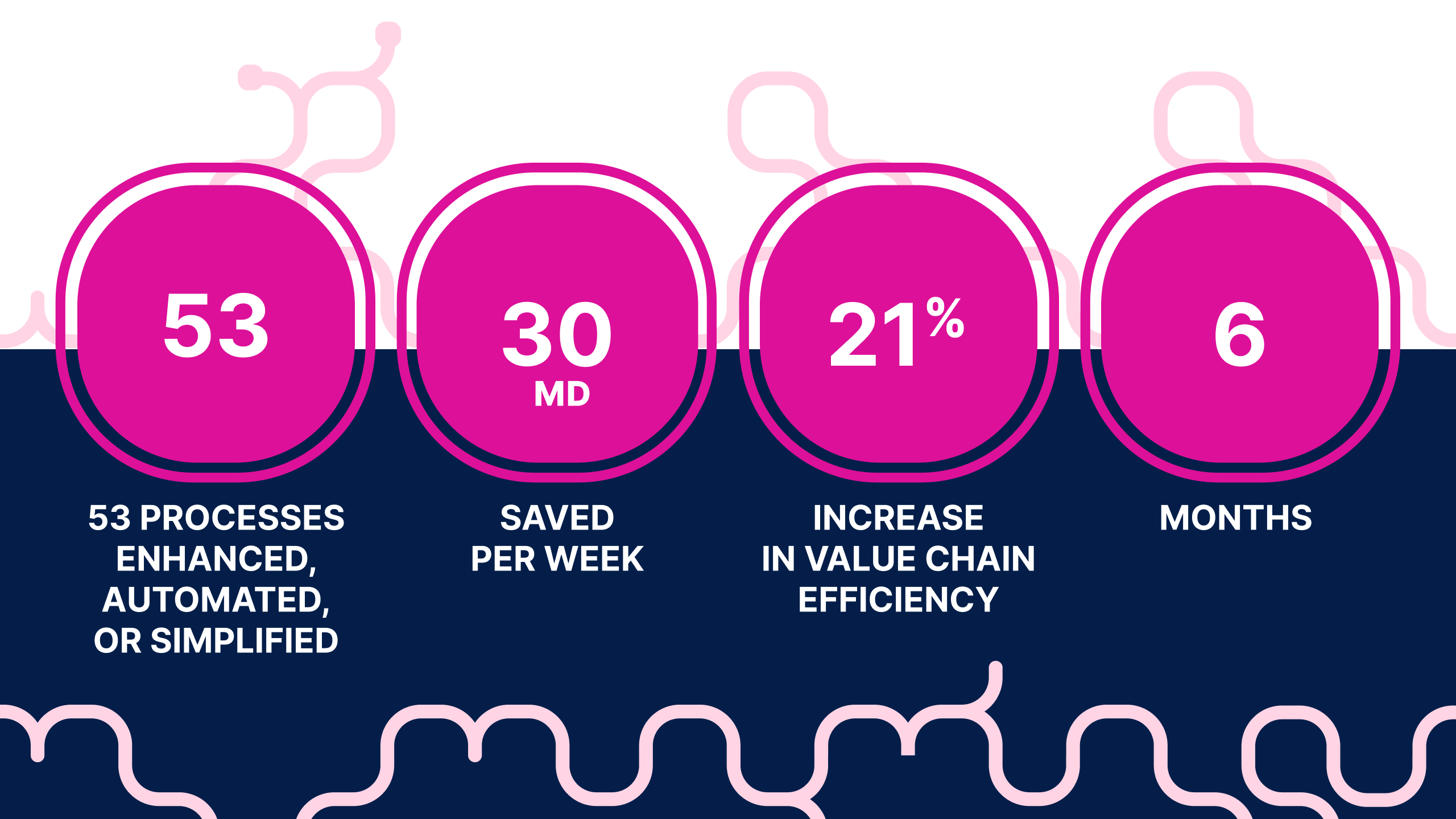
These numbers aren’t fluff. They came from mapping real workflows, identifying time sinks, and assigning digital agents to do the heavy lifting—whether in development, support, or sales.
Workflow automations and AI agents: Helpers your team needs
Let’s be honest—AI isn’t going to replace your people. But it will replace companies that don’t know how to use it.
Our COO shared simple, pragmatic questions every team should ask to find automation opportunities:
- Where are we leaking time or money?
- What processes require high human load but low human insight?
- What tasks can be automated end-to-end without losing value?
For example:
- Developers now use AI code reviewers and bug fixers.
- Sales teams get automated prep for meetings and lead enrichment.
- Support teams handle 100+ tickets per week with AI-assisted resolutions.
The impact? People are freed up to focus on what actually moves the business forward.
AI adoption: Start small, scale fast
The journey doesn’t start with AI agents. It starts with clarity. Daniel’s advice: map your processes, identify friction, and bring visibility to what’s broken. Then—pilot automations. Validate. Iterate. And only then bring in AI agents to scale. Want proof?
Daniel demoed a live AI agent in Microsoft Teams that fetches Easy8 tasks, checks overdue items, prepares performance reviews, and even creates tasks—all from a chat interface.
This isn’t a pitch—it’s reality. One that saved our company hours of manual work per manager every single week.
“AI gave us capacity and capabilities we didn’t have before. It’s like hiring six people without hiring anyone.” — Daniel Zach, COO, Easy Software
Boosting efficiency with AI Agents and workflow automation
After six months, from the COO’s point of view, AI agents and workflow automation turned scattered operations into measurable outcomes—eliminating manual waste, reducing defects, syncing data across tools, freeing up 30 man-days per week, and boosting end-to-end efficiency by 21%, all while giving teams clarity, consistency, and more time for valuable work. All in all, we automated 53 processes and created the equivalent capacity of 6 full-time people.
Ready to see what AI can really do for your operations and get even more insights? Watch the full webinar recording and get hands-on with the real use cases at The Wall Breakers Club.
Also register for the next 5 live webinars and discover how AI Agents are transforming development, support, sales, project management, and even security.

Frequently asked questions
What is the difference between automation workflow and AI agent?
The key difference between an automation workflow and an AI agent lies in their structure and autonomy.
- Automation workflow is a structured and predefined sequence of steps designed to handle specific, usually repetitive tasks. These workflows follow explicit rules laid out by a developer: "if X happens, then do Y." Workflows are predictable, linear, and operate within fixed boundaries without deviation. They are excellent for consistent, well-mapped processes where control and reliability are priorities.
- AI agent, on the other hand, is an autonomous system that is goal-oriented and capable of making decisions independently. Instead of following a fixed sequence, AI agents analyze their environment, plan their own steps to reach goals, adapt to new information, and handle complex or unforeseen situations dynamically. They choose their own actions, can learn over time, and operate flexibly with minimal human intervention.
What is the difference between manual and automated workflows?
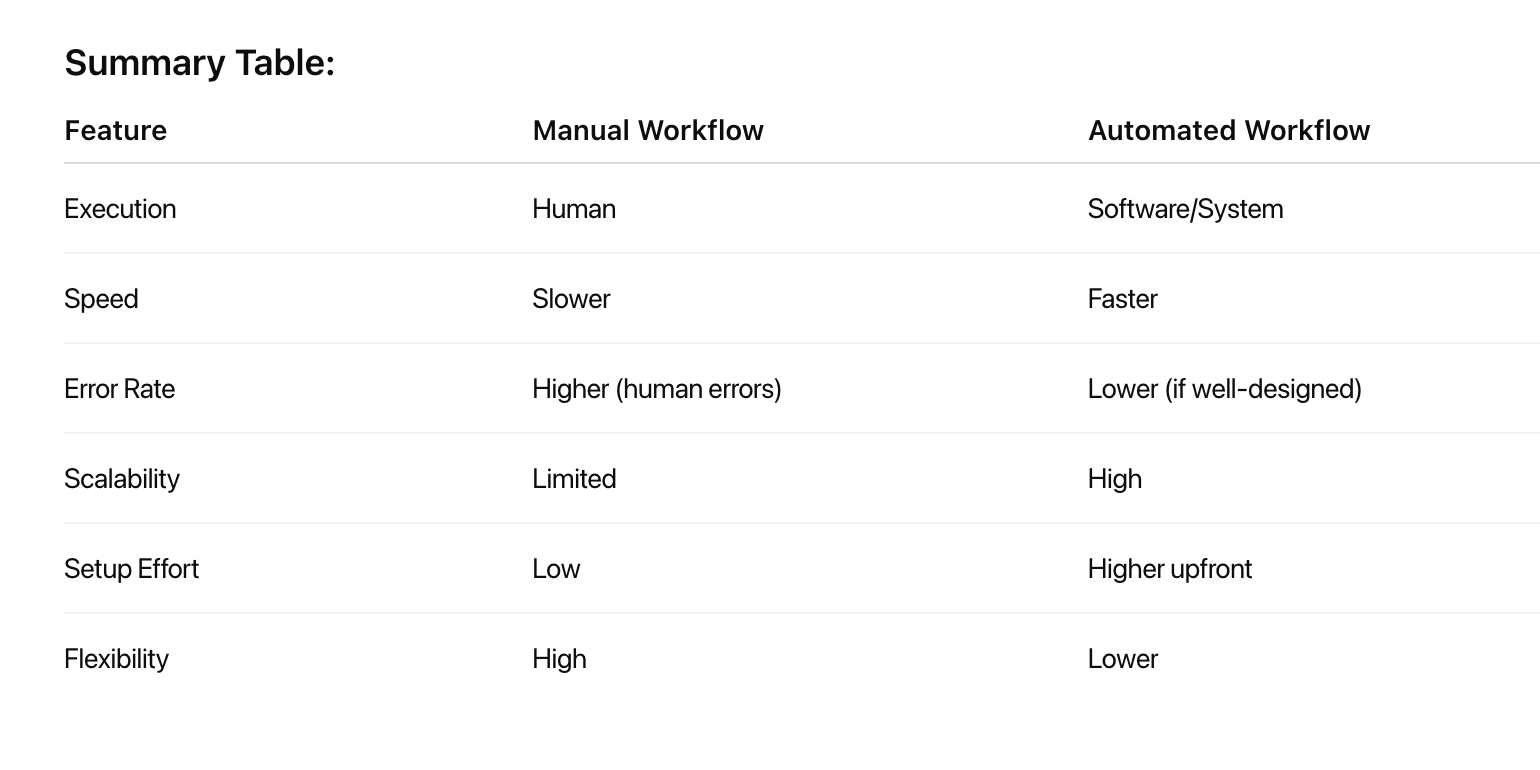
The fundamental distinction between manual and automated workflows lies in how tasks are executed, managed, and completed within business processes. Understanding these differences is crucial for organizations evaluating their operational efficiency and considering automation investments.
- Manual workflows rely on human intervention at every step, where employees perform tasks through direct action, decision-making, and coordination. These processes typically involve paper-based forms, email communications, spreadsheet management, and personal oversight of task progression.
- Automated workflows use technology and software systems to execute predefined tasks with minimal human intervention. These systems follow pre-established rules and triggers to move work forward automatically, handling routine operations without constant manual oversight.
Key differences comparison:
What are examples of workflow automation?
Examples of workflow automation span a wide range of business functions and industries, typically aimed at automating repetitive and manual tasks to boost efficiency, accuracy, and productivity.
Here are some concrete examples:
- Employee onboarding and offboarding: Automating the collection and sharing of new hire information across departments like HR, Payroll, and IT; offboarding workflows ensure security and information continuity when employees leave.
- Expense reimbursement: Employees submit online reimbursement requests which are routed automatically for manager approval, finance evaluation, and payroll integration, sometimes with rules for automatic approval of small expenses.
- Employee status changes: Automate updating employee status data across HRIS and other systems when promotions or terminations occur, sending notifications for each change.
- Customer service workflows: Automate case creation, customer ID verification, dispute handling, and notifications to speed up support and improve case resolution quality.
- Sales workflows: Automate quote creation, contract approvals, onboarding new customers, follow-up reminders, and renewal reminders to reduce admin work and accelerate sales cycles.
- Marketing workflows: Automate social media post scheduling, negative review responses, customer opt-out management, lead generation reports, and engagement tracking.
- IT support workflows: Automate employee account setups, software/device requests, project requests, and service ticket handling to accelerate IT operations.
- Project and task automation: Automatically assign tasks based on status changes, deadlines, and availability; streamline sprint planning and bug triage in product development.
- Customer support ticketing: Ticket routing, acknowledgment, and resolution tracking through automated systems reduce response times and free staff for complex issues.
What are n8n AI agents?
n8n AI agents are autonomous, intelligent workflows that leverage large language models (LLMs) and integrated tools to perform complex tasks without predefined, rigid rules.
They act as decision-making entities within n8n, capable of interpreting user intents, planning multi-step actions, and executing them through connected services and APIs. By embedding AI Agent nodes, n8n enables developers and non-developers alike to create adaptive systems that can, for instance, analyze data, generate content, manage appointments, and perform autonomous research.
These agents extend n8n’s traditional workflow automation by introducing reasoning engines, tool integrations, memory management, and real-time decision-making.
Related articles

How Easy AI helps your organisation with AI adoption
AI is no longer a future trend. It’s a necessity for every organisation aiming to stay competitive. Keep reading to find out how global enterprises adopt AI and how Easy AI is already transforming project management to help your company reach the next stage of AI maturity.

The AI adoption curve: Where companies really are in 2026
AI is no longer a futuristic concept. It's a present-day power play reshaping how companies compete, grow, and operate. But while many businesses have jumped on the AI wave, only a few know how to turn potential into performance. Do you know where your organization stands?

Workflow automations and AI adoption: Use automated workflow to cut manual tasks
Turn chaos into control with one-click Automation Buttons and AI-powered workflows—freeing your team from manual clutter and bringing focus back to what truly moves your projects forward. Read the article to find out how!
