


Workflow automations and AI adoption: Use automated workflow to cut manual tasks
Turn chaos into control with one-click Automation Buttons and AI-powered workflows—freeing your team from manual clutter and bringing focus back to what truly moves your projects forward. Read the article to find out how!

Table of contents
Repeated manual operations reduce efficiency
What are Automation Buttons
Benefits of Automation Button
How Automation Buttons make daily work easier
1. For project managers
2. For service desk agents
Next stage of AI adoption: Workflow automation
Benefits of automation workflow
AI adoption and workflow automation made simple
AI adoption and workflow automation made simple
TL;DR
Easy8 Automation Buttons and AI-powered workflows eliminate repetitive tasks, saving time, boosting accuracy, and freeing your team to focus on what matters. Climb the AI adoption ladder as soon as possible.
Repeated manual operations reduce efficiency
Are you tired of the relentless grind of repetitive manual tasks in your daily work? From project managers buried in updates and reports to service desk agents handling endless tickets, too much time is lost to routine administration instead of meaningful progress.
What are Automation Buttons
Automation Buttons in Easy8 software are customizable one-click triggers designed to streamline repetitive task operations.
These buttons enable users—especially service desk agents and project managers—to automate simple task operations, such as task assignment, priority escalation, workflows aligned with SLA requirements, bug reporting and subtask creation.
Each button executes a set of actions that you can predefine and which would typically require multiple manual steps, reducing time spent on administrative overhead and ensuring consistency in your WorkOps.
The Automation Button in Easy8 is particularly useful for triggering workflows in n8n or any other external application. It allows the task information to be passed on to external systems, enabling more precise and meaningful actions. Additionally, users can use Automation Buttons to run advanced AI automation via Easy8.ai.
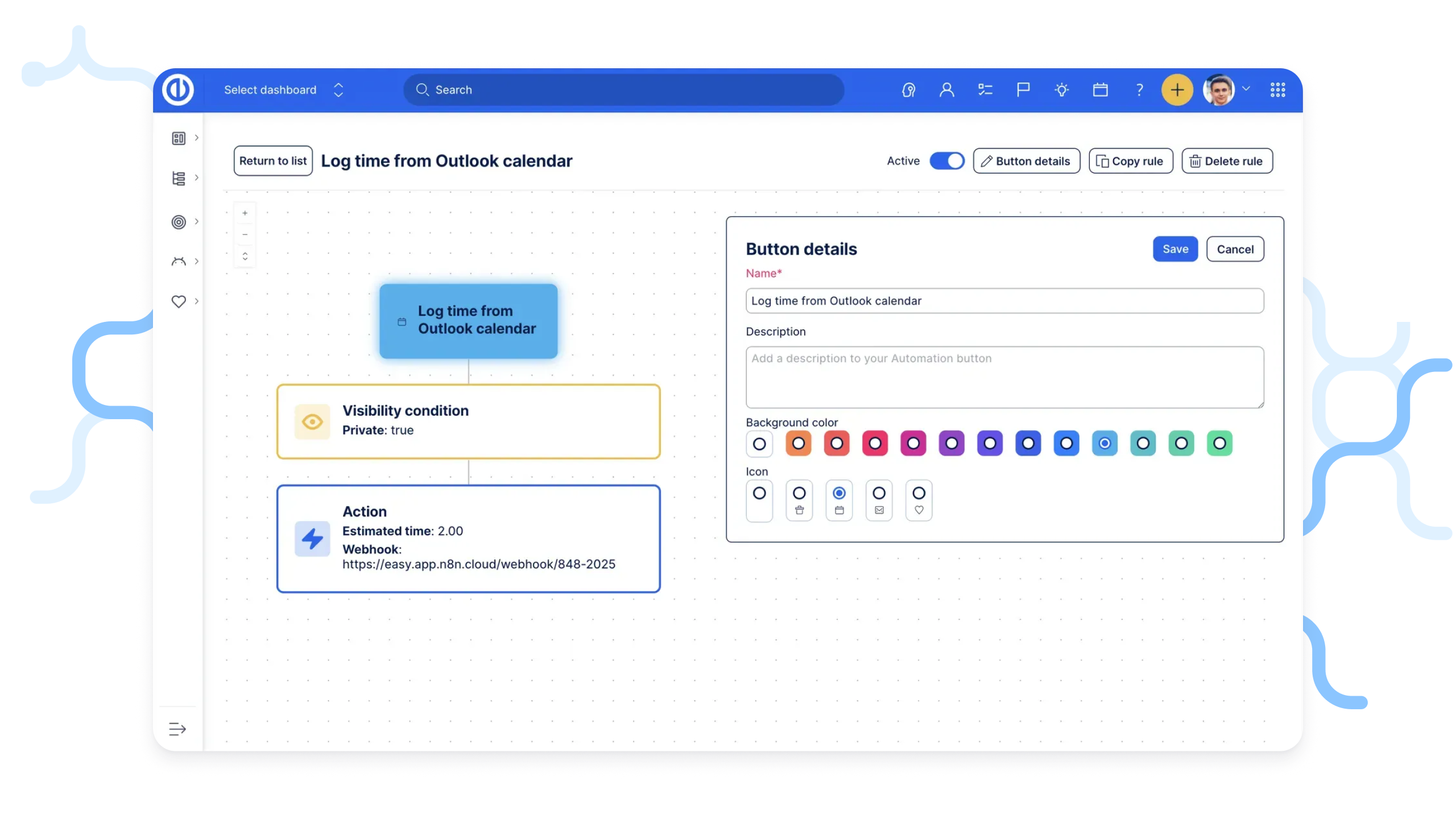
Automation Button in Easy8
Benefits of Automation Button
- Time savings: A single click can replace numerous manual steps, significantly reducing administrative overhead.
- Enhanced accuracy: Preset templates and rules minimise human errors in data entry, task assignments, and report generation, ensuring consistent and repeatable processes.
- Boosted SLA compliance: Particularly invaluable for helpdesk scenarios, enabling rapid responses and updates critical for meeting service level agreements.
- Scalability: Complex workflows become effortlessly replicable across various teams and projects, eliminating the need for extensive additional training.
How Automation Buttons make daily work easier
Automation Buttons aren’t just a technical feature—they’re a way to cut through repetitive clicks and give teams more time for real work. Here’s what that looks like in practice:
1. For project managers
Instead of manually setting everything up, project managers can launch a new feature with a single click. Subtasks for each phase—Design, Development, QA—are created automatically, and a note is added to the parent task (“New feature started”) to keep everyone aligned.
Tasks can be instantly assigned based on team availability or skills, while statuses, deadlines, and progress updates adjust themselves in seconds.
2. For service desk agents
Support teams benefit just as much. With one click, you can take ownership of a ticket—your name is set as the assignee, the status changes to ‘Assigned,’ and the client automatically gets a first-response email. Escalating a ticket is just as fast—urgency goes up, managers get notified, and the case is rerouted to the right person. Agents can also automate client notifications or create internal bug reports without extra steps, keeping the process smooth for both the team and the customer.
Next stage of AI adoption: Workflow automation
Once you’ve mastered basic task automation, the natural next step in climbing the AI adoption ladder is automating entire workflows. This shift moves you from speeding up individual actions to creating fully connected, end-to-end processes.
With tools like n8n, you can link multiple applications, data sources, and services so they work together automatically.
Instead of manually triggering each step, your automated workflows can now run on their own—whether it’s processing customer requests, updating project records, or sending alerts when certain conditions are met.
This stage isn’t just about saving time. It’s about building intelligent, responsive systems that free your team to focus on more valuable work, while AI quietly takes care of the routine behind the scenes.
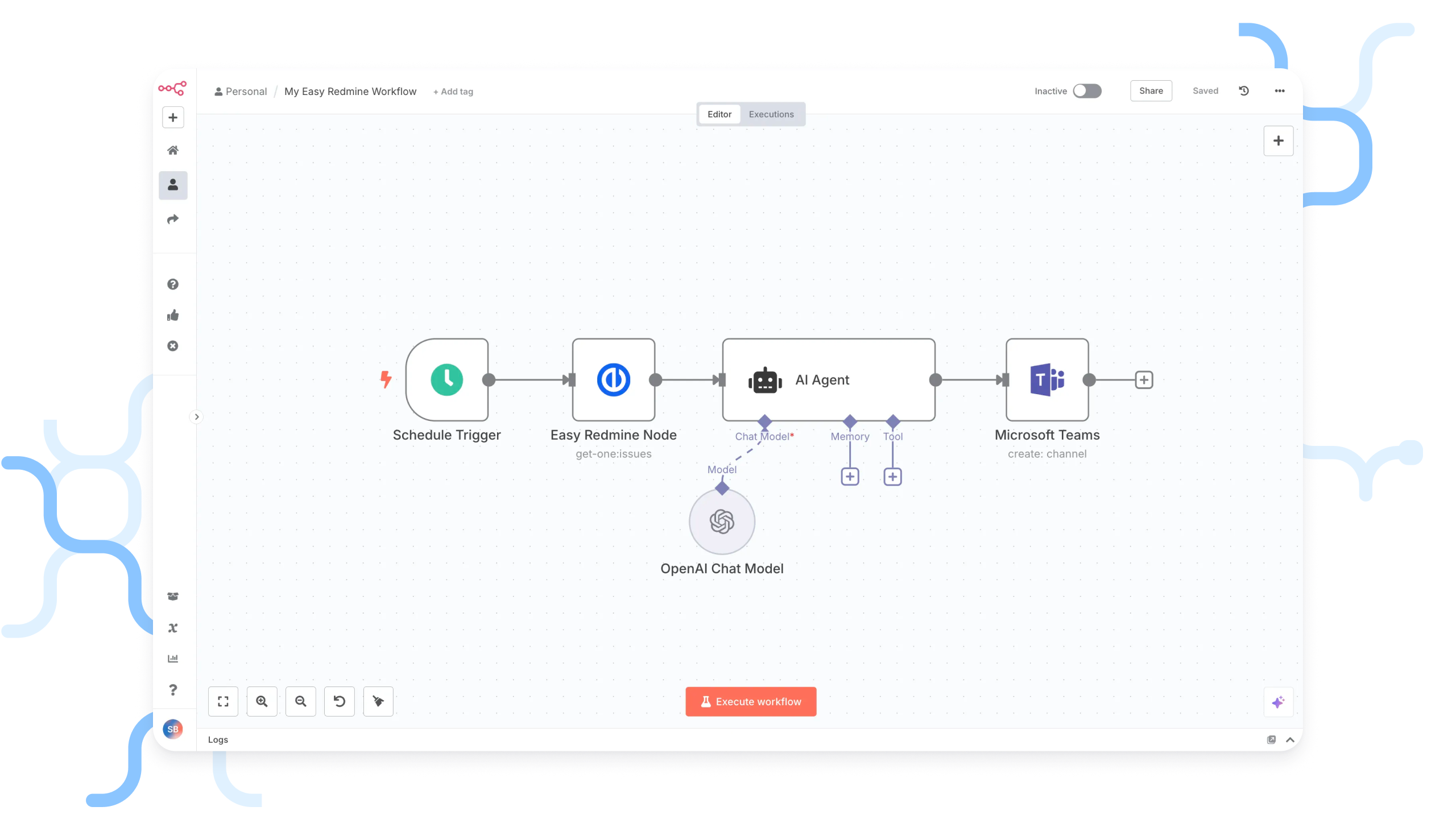
Automated workflow example
Benefits of automation workflow
Workflow automation offers several general advantages across business functions:
- Increased efficiency: Automated workflows handle tasks faster than manual processes, reducing processing time (e.g., approving requests or completing routine tasks in seconds rather than days). This efficiency frees employees to focus on higher-value, strategic work.
- Cost savings and ROI: By replacing manual effort in repetitive tasks, organizations save on labor costs and operational expenses. Over time, automation investments (such as workflow tools or RPA bots) yield a high return on investment through reduced overhead and improved productivity.
- Error reduction: Automation reduces human error by standardising tasks like data entry and calculations—this improves accuracy and cuts down time spent on fixing mistakes.
- Improved compliance: Automated workflows ensure compliance by following regulatory steps and creating audit trails automatically.
- Scalability: Workflow automation allows workflows to scale effortlessly with growth, handling higher volumes without extra cost or staff. This is key for growing teams or seasonal spikes like mass onboarding or helpdesk surges.
AI adoption and workflow automation made simple
From design to deployment, Easy8.ai handles everything for you, powered by the n8n. Easy8.ai connects Easy8 with the powerful n8n platform to automate complex workflows across tools and departments—without the need for coding.
With ready-made templates and fast deployment, you can go from idea to working automation in just weeks. It’s fully supported, secure, and flexible, offering cloud, on-premises, or hybrid installation to fit your data and compliance needs.
This means you get robust, scalable automation tailored to your needs — without the complexity of building it all yourself. And why n8n? Because it’s a leader in the field of automation tools, trusted by organisations worldwide for flexibility and reliability.
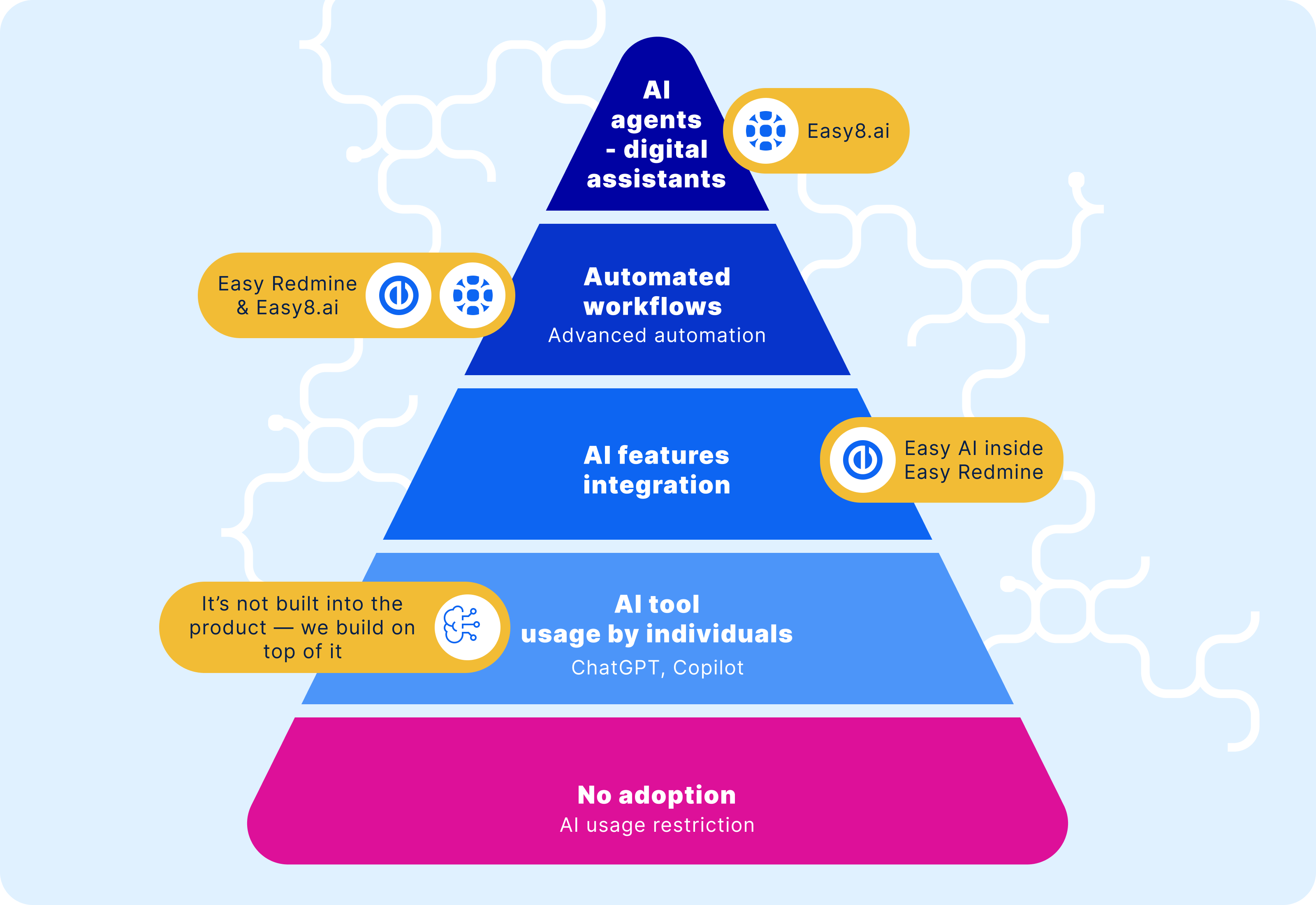
AI adoption pyramid by Easy8
AI adoption and workflow automation made simple
In Easy8, you can start small with Automation Buttons—perfect for everyday actions in support, projects, or operations. No coding, no hassle, just one-click shortcuts that save time. These buttons aren't limited to simple workflows—while you can use them for basic automation, their real value shines when integrated into complex workflows, especially those involving AI-powered processes within Easy8.ai. This integration essentially bridges internal and external automation, making both environments work as a cohesive system.
When you’re ready to go further, Easy8.ai powered by n8n helps you connect the dots across systems like CRM, ERP, or email. It’s workflow automation that grows with you—scalable, secure, and tailored to your needs.
Start small and scale big with the power of automation! Explore how Automation Buttons and future automation workflows can transform your project management. Contact our sales team to guide you through solutions that address your hurdles with AI adoption!
Frequently asked questions
What is the difference between automation workflow and AI agent?
The key difference between an automation workflow and an AI agent lies in their structure and autonomy.
- Automation workflow is a structured and predefined sequence of steps designed to handle specific, usually repetitive tasks. These workflows follow explicit rules laid out by a developer: "if X happens, then do Y." Workflows are predictable, linear, and operate within fixed boundaries without deviation. They are excellent for consistent, well-mapped processes where control and reliability are priorities.
- AI agent, on the other hand, is an autonomous system that is goal-oriented and capable of making decisions independently. Instead of following a fixed sequence, AI agents analyze their environment, plan their own steps to reach goals, adapt to new information, and handle complex or unforeseen situations dynamically. They choose their own actions, can learn over time, and operate flexibly with minimal human intervention.
How do I automate my business with AI?
- Start by auditing and prioritizing your workflows to identify high-impact, repeatable tasks suitable for AI automation.
- Choose the right mix of technologies—such as RPA, ML models, NLP, or generative AI—and implement them via low-code platforms, APIs, or custom development.
- Orchestrate and monitor your solutions with MLOps practices, ensure stakeholder buy-in and governance, then iterate from pilots to full-scale deployment.
What are examples of workflow automation?
Examples of workflow automation span a wide range of business functions and industries, typically aimed at automating repetitive and manual tasks to boost efficiency, accuracy, and productivity.
Here are some concrete examples:
- Employee onboarding and offboarding: Automating the collection and sharing of new hire information across departments like HR, Payroll, and IT; offboarding workflows ensure security and information continuity when employees leave.
- Expense reimbursement: Employees submit online reimbursement requests which are routed automatically for manager approval, finance evaluation, and payroll integration, sometimes with rules for automatic approval of small expenses.
- Employee status changes: Automate updating employee status data across HRIS and other systems when promotions or terminations occur, sending notifications for each change.
- Customer service workflows: Automate case creation, customer ID verification, dispute handling, and notifications to speed up support and improve case resolution quality.
- Sales workflows: Automate quote creation, contract approvals, onboarding new customers, follow-up reminders, and renewal reminders to reduce admin work and accelerate sales cycles.
- Marketing workflows: Automate social media post scheduling, negative review responses, customer opt-out management, lead generation reports, and engagement tracking.
- IT support workflows: Automate employee account setups, software/device requests, project requests, and service ticket handling to accelerate IT operations.
- Project and task automation: Automatically assign tasks based on status changes, deadlines, and availability; streamline sprint planning and bug triage in product development.
- Customer support ticketing: Ticket routing, acknowledgment, and resolution tracking through automated systems reduce response times and free staff for complex issues.
Which tool is used for workflow automation?
The tools used for workflow automation, as shown in the report by Similarweb, are:
- n8n
- Gumloop
- Zapier
- Make
These platforms help users connect apps, automate tasks, and orchestrate complex business logic with minimal or no code, streamlining operations and reducing the need for manual processes.
What is the difference between manual and automated workflows?
The fundamental distinction between manual and automated workflows lies in how tasks are executed, managed, and completed within business processes. Understanding these differences is crucial for organizations evaluating their operational efficiency and considering automation investments.
- Manual workflows rely on human intervention at every step, where employees perform tasks through direct action, decision-making, and coordination. These processes typically involve paper-based forms, email communications, spreadsheet management, and personal oversight of task progression.
- Automated workflows use technology and software systems to execute predefined tasks with minimal human intervention. These systems follow pre-established rules and triggers to move work forward automatically, handling routine operations without constant manual oversight.
Key differences comparison:
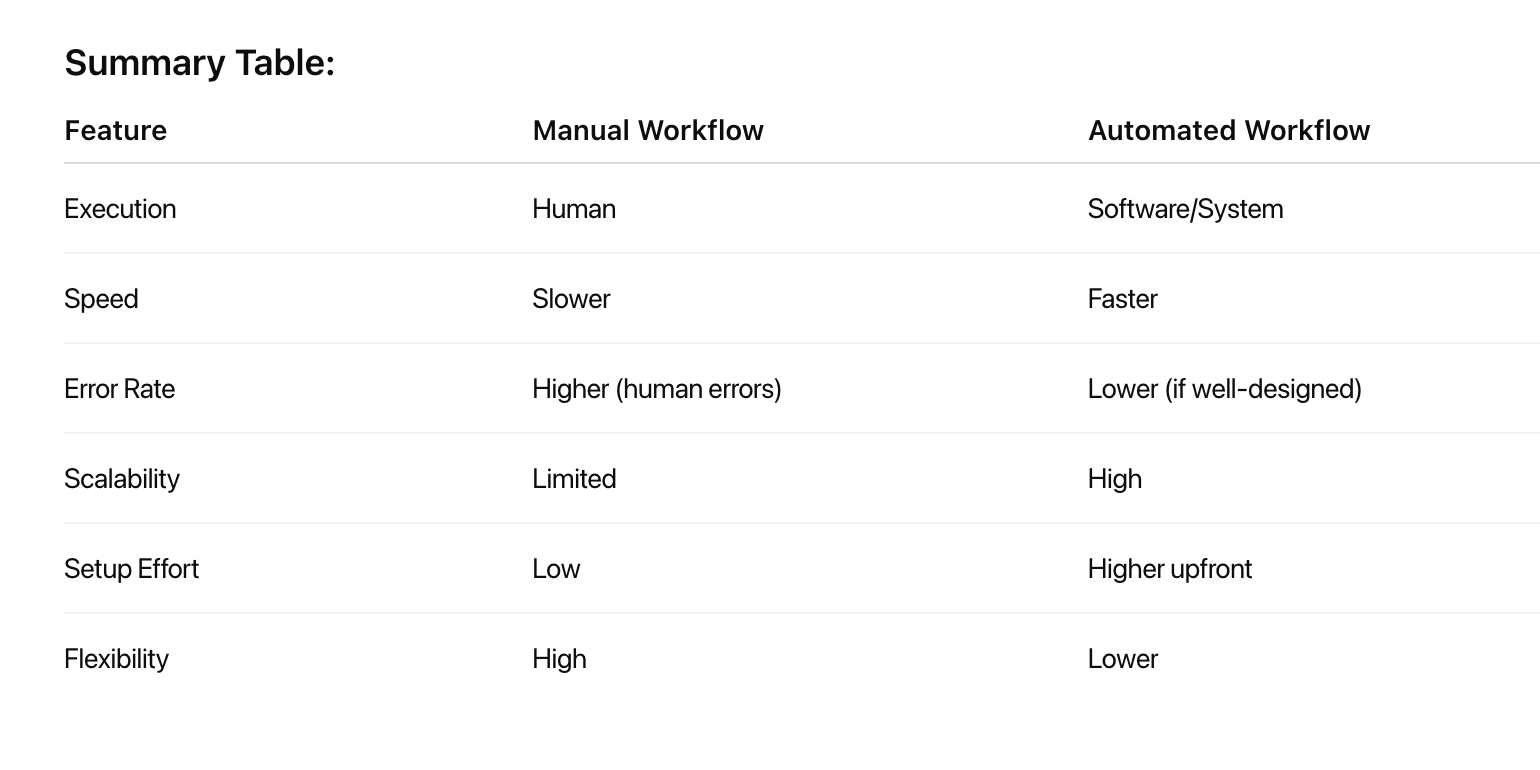
Can Easy8 automate repetitive project management tasks?
Yes, Easy8 can automate repetitive project management tasks through its Automations feature. This functionality allows users to:
- Update multiple task fields and add comments with a single click (serving as a replacement for legacy Easy buttons).
- Trigger the creation of tasks, subtasks, or related tasks from templates in one action.
- Send webhooks from tasks to external systems for further automation.
Additionally, there is a built-in feature Automation buttons. Upcoming releases are expected to expand automation capabilities further, including options like periodic triggering and triggering via links or lists as input.
Automations are designed to streamline repeated processes, making project management more efficient and reducing manual effort.

Related articles

Webinar recording: How to lead the change from Excel to AI & automation
Digital transformation is not just a FOMO. It is a must—new standard. Read the article or watch the webinar recording to discover why successful AI adoption relies on thoughtful change management, precise process mapping, and a hybrid planning–agile execution approach that puts people first.

Unleash automation power: Easy8 is now on n8n Cloud!
Struggling with disconnected tools and repetitive tasks? AI agents can turn your chaos into smart, automated workflows. Learn how Easy8’s official node in n8n Cloud connects your data to real automation. Fast and with the flexibility that your business needs.

Why on-premises AI is the secure future for compliant businesses
AI is changing everything—but are you in control of your data while staying compliant?
As new regulations like the AI Act come into force, the smartest companies are rethinking their infrastructure and choosing on-premises AI to stay secure, cost-effective, and future-ready. Continue reading to find out more!
