en
Language
  • en
  • cs
  • hu
  • de
  • fr
  • es
  • br
  • ru
  • kr
  • jp
AI translation
  • it
  • pl
  • tr

Easy8 Docker (on-premises deployment)

Next level of on-premises deployment is music to the ears of server admins whose life is about to get a lot easier. Using Docker technology, Easy provides applications and all of its dependencies in the current supported versions, while guaranteeing all of the contents. 

“Installation” and “Updates” are quicker and easier. Quotation marks because, in fact, there is no installation or updating. Just orchestrating preinstalled docker images with simple and standard commands.

Watch a 2-minute video and find out why Docker installation is a real game changer. 

Watch video

Docker is rightfully becoming more popular in the complex agenda of running web applications. This page summarises how Docker is used by Easy8 to benefit users of the server (on-premises) solution.

Advantages of Docker solution compared to legacy deployment

Docker deployment offers significant advantages over traditional methods, addressing critical challenges in cost, efficiency, and security. 

Lower costs of maintenance

Your server admin spends considerably less time on application updates because the process is automated. 90% of legacy manual procedures are eliminated with Docker. Also, the admin does not maintain components surrounding our application (before any update can take place).

Minimized risk of human error

Thanks to the automation of the update procedure your team can focus on critical business operations while minimising downtime and the risk of human errors.

Increased security

The ease of the procedure allows for updates installation to be made more regularly (at a lower cost), which is one of the fundamentals of IT security. Docker container is an isolated environment - any interactions with the rest of the ecosystem are under full control of your security engineers and procedures.

Hardware and software requirements for Docker solution

The most exciting part of the Docker solution is that the server admin has incomparably fewer components to worry about. While the legacy deployment method required to prepare the OS, Ruby, Database server, and others in proper state (version) before installing the application itself.

Now, you only need a server with amd64* architecture (*arm devices like M1, M2 can still run dockerized Easy8, but only from within a virtual machine), Docker engine and Docker compose in correct versions. Find and review the currently supported versions of the Docker engine and Docker hardware and software requirements.

Download your Docker installation credentials in the Client zone now and streamline your Easy8 deployment in just a few steps.

Receive Docker credentials

The process: How to install Docker

In other words, what are the steps to install and update your Easy8 application in Docker?

First installation:

1. Purchase the server solution.

2. Log in to the Client zone.

3. Download the Docker "package".
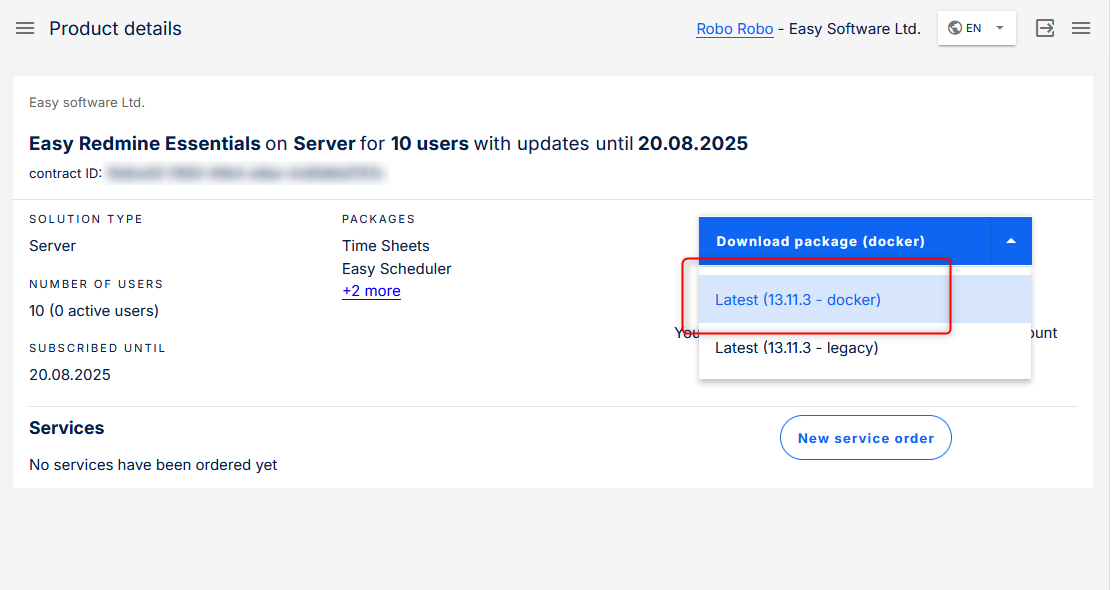

Docker package


4. The package contains every explanation for every step that follows.

5. It is maintained regularly, which is the reason why we are not listing it in this article.
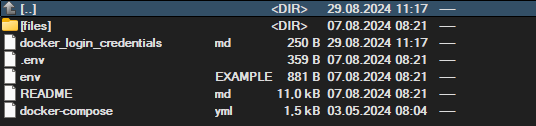

Docker file in computer


-  Login credentials to the docker registry, which contains an image with your purchased solution.
-  A very detailed and precise README manual to prepare your environment.
-  Configuration files and examples for an easier start.

6. Prepare your environment with the help of the resources above.

7. Log in to the source of your ER Docker image and run a few commands to download and launch it.

For future updates:

1. Log in to your docker container.

2. Run a command that downloads and replaces your existing version with the new one (your data and attachments, of course, remain intact).

That's it!

Docker vs legacy

If you are still not fully convinced about the advantages of Docker, perhaps a schematic view might make the situation a bit clearer.

In legacy deployment, the server admin installs the source code, for which they need to precisely prepare every required component. Otherwise, there is a big risk the application will not install properly.
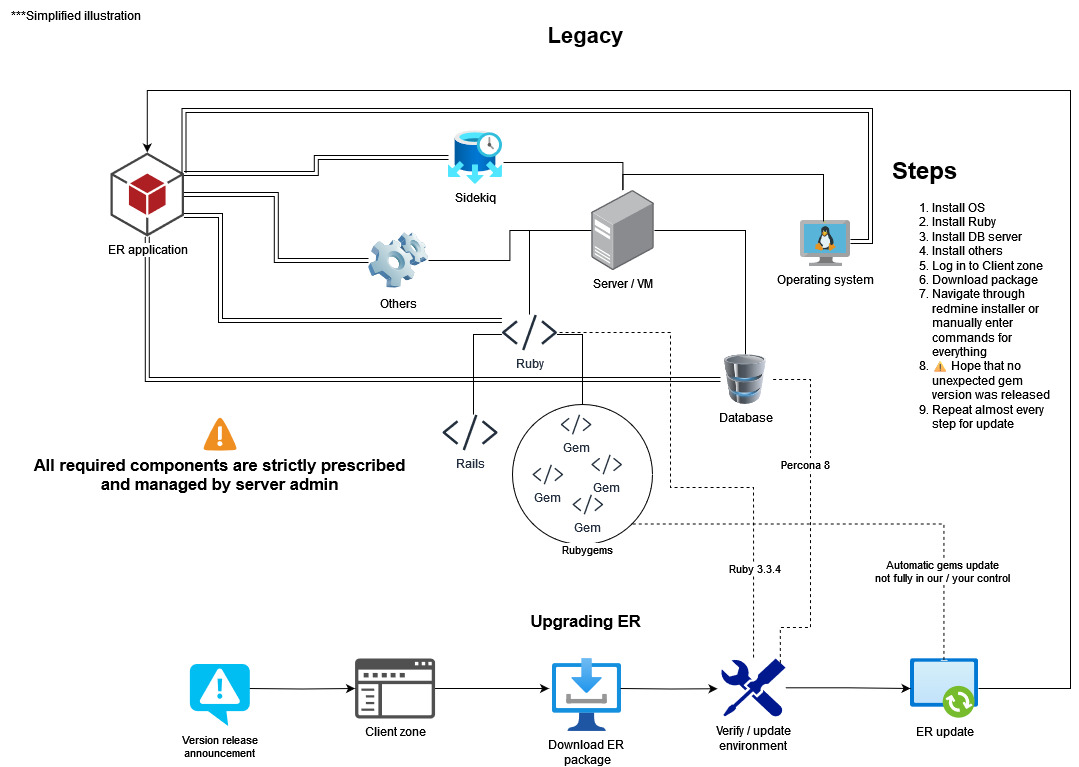
Deploy Legacy


With Docker deployment, the server admin installs the Docker engine and compose. Initially, also prepares the environment based on .ENV configuration files (examples are provided from our side). 

Once the initial configuration is done, it becomes smooth sailing in terms of installation and updating—the installation and update of our application plus every requirement is automatic.
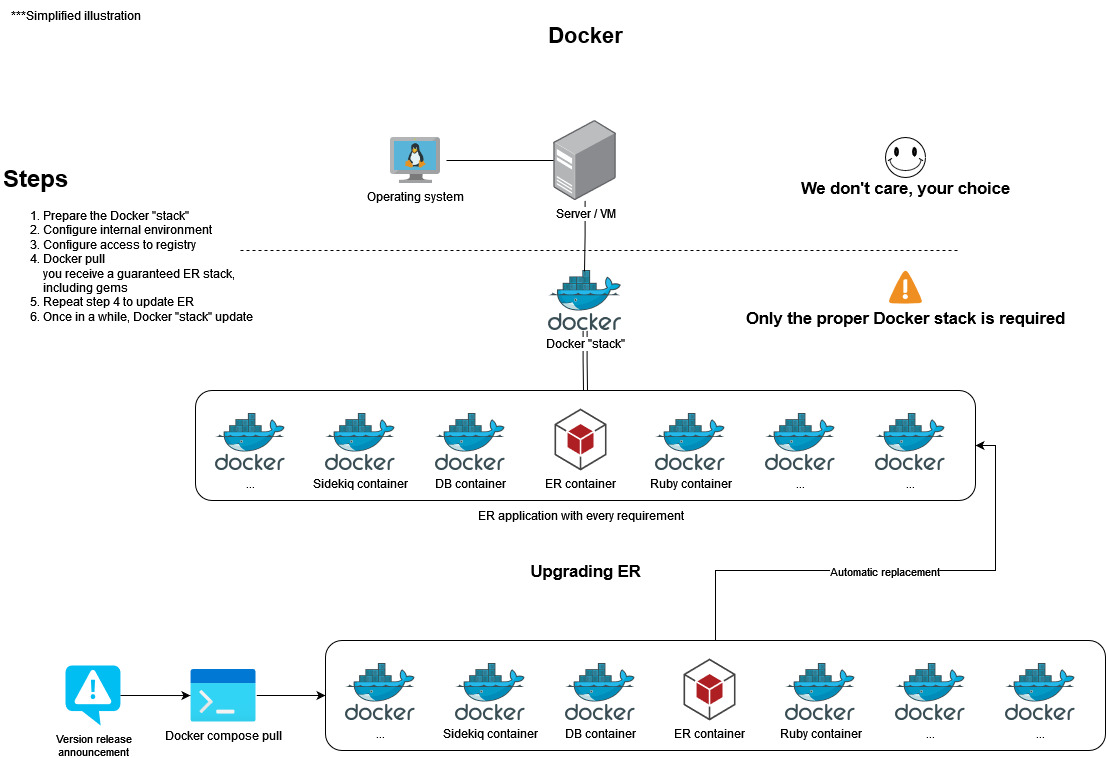
Deploy Docker in Easy8 software


Received all the needed information? Get your Docker installation credentials in the Client zone and simplify the process of deploying Easy8 effortlessly.

Receive Docker credentials

Frequently asked questions

How to switch from legacy to Docker installation?

It is a matter of starting the new Docker application and migrating data from the existing one. We describe it in detail in this migration guide.

Can I still audit the code with the Docker solution?

Absolutely! Uncompiled code is still a part of the delivery of our software, packaged in a Docker container, which the server admin has access.

What if we are not allowed to install Docker on our servers?

We understand companies may take time to thoroughly examine new technologies before considering them trustworthy. We offer an option of VM (ova image), which runs the Easy8 Docker solution within. That will give you an additional layer of control.

Just please consider—one of the key strengths of Docker is the isolation. Nothing interacts outside of the container unless explicitly permitted.

What kind of support is available for migration to Docker solution?

If you went through all existing documentation for Docker migration, but have still not achieved your desired state, contact our support with as precise a description of your issue as possible. We are determined to help you get over the line.

How is Dockerized Easy8 delivered?

That is the beauty of it. Enter credentials to a dedicated Docker image registry (where we upload new versions just for you) and run a standard command to pull the latest available image. Updates are reachable directly from your server.

VM image (.ova) with Docker inside is available on demand, and you will find it in the Client zone. Once you are running it, access to updates is as described above.

Which operating systems are supported?

You can use any OS, preferably UNIX based (CentOS, Debian, Ubuntu, RHEL, Rocky Linux, etc. ) on amd64 architecture, which supports Docker engine and compose.

Windows subsystem for Linux was found to have a blocking limitation in data indexing (full-text search), which makes it unfortunately incompatible.

If your OS does not comply and you are not allowed to change it, there remains the option to use a VM with our dockerized solution inside.

What do I have to actually manage with Docker solution?

While Docker takes care of running the application, including the technological stack, there is naturally agenda, which needs configuration specific to your ecosystem. 

These include:

  • backups: README describes the proposed solution. Location and frequency is, however, up to you
  • mail server: in other words, SMTP server via which application sends notifications
  • webserver configuration
  • domains: only you know which domain(s) should the application be available at
  • HTTP vs HTTPS: by default HTTPS is enforced, to override it to HTTP, you need to set an env variable 
  • certificates: if you use self signed certificates (for SSL, LDAPS or others), you need to let the server know about them
  • firewall: again, this is infrastructure specific
  • monitoring: by nature, monitoring must come from outside and each company has their own tools and aggregators
  • limits: allowed API requests in period, upload limits, timeouts, etc. are under your control
  • disk size: keep an eye on the remaining disk dedicated to your application

And various others outside the application depending on the company standards. Information about all of these is available in README and example files provided with your Easy8 Docker info package.

What is Docker vs Kubernetes?

In context of Easy8, Docker container is our application including all its dependencies. Kubernetes is an automation system to manage a fleet of Docker (and other) containers, including scaling, updating, monitoring, etc.

How to understand Docker vs VM (virtual machine)?

While Docker is a form of virtualization, it works in a different way, which cannot be called a VM. Technical term for Docker solution is a container.

How much does Docker cost?

The free plan is sufficient to run Easy8 on. Bigger companies may be required to use a paid plan to legally use Docker. But even the smallest paid plan is enough to run our application.

How can Dockerization help with performance?

A good example is to run multiple containers with the application with load balancing. While it is somewhat advanced set-up, Dockerization allows for better management of such system.

Try Easy8 in 30 days free trial

  • Access all features
  • SSL protected
  • No credit card required