


WorkOps in practice: Planning connected to execution
Good delivery starts with good planning. Before companies automate workflows, introduce AI, or scale operational processes, they first need one thing: a connected planning system.
They need to understand how projects, resources, priorities, risks, delivery capacity, and operational activities influence each other across the organisation. This is where WorkOps planning begins.
Planning is no longer just about creating timelines or assigning tasks. It is about building a continuously evolving operational system where plans react to real delivery signals, changing priorities, resource availability, customer needs, and operational risks.
In Easy8, we work with three layers:
- Planning starts with connected project planning, where Gantt, WBS, milestones, dependencies, Agile boards, and Resource Management help teams structure delivery in one shared operational environment.
- The next step is AI-assisted planning, where the AI Project Planner helps transform documents, sales handovers, meeting outputs, and implementation requirements into structured project plans, milestones, risks, dashboards, and delivery tasks automatically.
- And finally, for more advanced scenarios, planning becomes predictive and operationally connected across systems. Through AI, APIs, MCP technologies, n8n automations, and historical delivery data, organisations can gradually move from manual project preparation toward adaptive and continuously optimised planning models.
Together, these three layers create practical WorkOps planning:
- Connected planning for operational visibility,
- AI for faster project preparation and coordination,
- Automations and connected systems for adaptive planning across the organization.

Planning in a project & work management tool
Planning is not just about creating tasks. It is about understanding dependencies, priorities, capacities, and delivery risks before execution starts. Check the examples of features in Easy8 that help with planning work and projects.
Gantt Charts
Gantt charts in Easy8 help teams transform project plans into a clear delivery timeline. Tasks, milestones, dependencies, and critical paths are visualised in one interactive view, making it easier to coordinate complex projects across teams.
Project managers can quickly adjust timelines using drag-and-drop scheduling while instantly seeing the impact on related activities. Dependencies help prevent bottlenecks, overlapping work, and missed deadlines before they happen.
Combined with real-time updates from the project itself, Gantt becomes a live operational planning layer instead of a static presentation chart.
Benefits:
- Clear visibility into project timelines and dependencies
- Faster replanning when priorities or deadlines change
- Better coordination between teams and parallel activities
- Earlier identification of delivery risks and bottlenecks
WBS (Work Breakdown Structure)
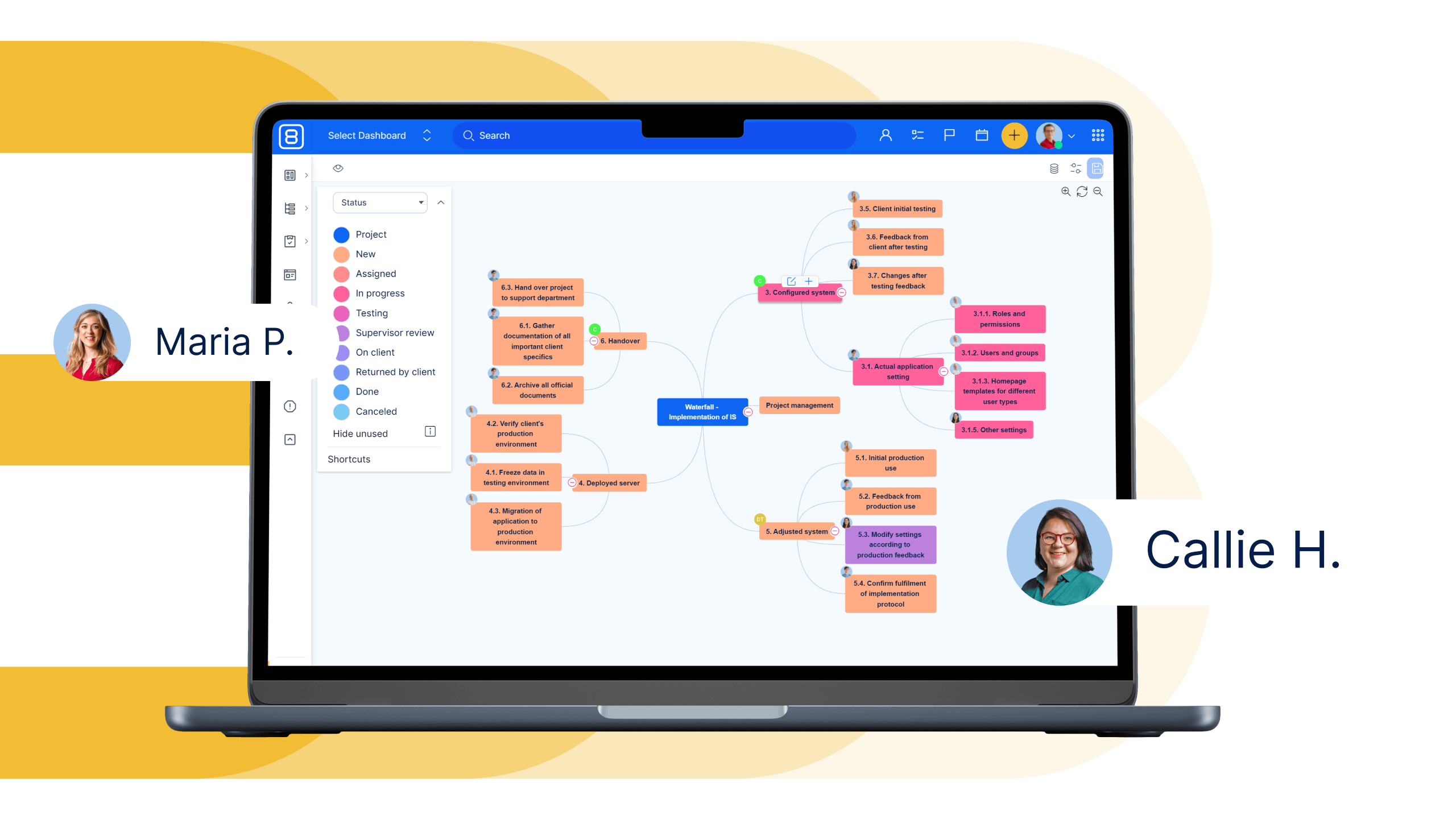
Work Breakdown Structure (WBS) helps teams structure projects into manageable deliverables, phases, and activities before execution begins. Instead of planning in isolated tasks, teams can build a logical project hierarchy that reflects real delivery workflows.
Easy8 allows users to visually create and edit project structures while connecting tasks, responsibilities, estimates, and dependencies into one operational view.
WBS helps organisations standardise planning processes across projects and ensures that important delivery steps are not forgotten during project preparation.
Benefits:
- Better project clarity and visibility before execution starts
- Structured planning aligned with real delivery phases
- Improved consistency across teams and projects
Resource Management
Planning projects without understanding team capacity often leads to overloaded employees, delivery delays, and constant reprioritisation.
Easy8 Resource Management connects project planning directly with real team availability.
Managers can allocate resources across projects, reserve future capacities, and identify conflicts before work starts.
Teams gain visibility into who is available, overloaded, or already assigned to other priorities.
The platform supports both detailed operational allocation and higher-level planning scenarios. Resource planning can also be combined with competencies, vacations, utilisation tracking, and future project reservations.
Benefits:
- Better balance between demand and team capacity
- Reduced resource conflicts across parallel projects
- Earlier visibility into overloads and delivery risks
- More predictable project execution and utilisation planning
Scrum Boards
Scrum Boards in Easy8 help teams turn Agile planning into a continuously evolving delivery flow. Backlogs, sprint priorities, task statuses, and team activities are managed in one interactive operational view, making it easier to coordinate iterative planning across teams.
Teams can quickly reprioritise work using drag-and-drop boards while instantly seeing sprint progress, blocked tasks, dependencies, and delivery capacity. Scrum Boards help organisations react faster to changing priorities without losing visibility over planned work and delivery commitments.
Combined with real-time project updates, automations, and operational data, Scrum Boards become a live planning layer instead of a static sprint management board.
Benefits:
- Clear visibility into sprint priorities and planned work
- Faster replanning when requirements or priorities change
- Better coordination between Agile teams and stakeholders
- Earlier identification of blockers and delivery risks
- Improved connection between planning and execution
AI Project Planner
The second layer of planning in Easy8 is AI-assisted project creation. Instead of manually building projects task by task, Easy8 uses native AI to transform documents, contracts, quotations, or project briefs into structured delivery plans automatically.
The Easy8 AI Project Planner analyses uploaded project documentation and generates a complete project structure directly inside Easy8, including WBS, tasks, timelines, dependencies, dashboards, risks, and stakeholder planning.
The generated structure can then be further refined using Gantt charts, WBS editing, resource planning, and automations across the WorkOps environment.
Click through the interactive demo to see how AI Project Planner transforms project documents into complete project plans in minutes.
Benefits:
- Dramatically reduces manual project setup time
- Accelerates project initiation and planning phases
- Automatically generates structured WBS and timelines
- Helps identify risks, stakeholders, and delivery dependencies earlier
- Creates a stronger starting point for predictable project execution
Instead of spending hours manually translating documents into project plans, teams can start with an AI-generated operational structure and focus on delivery decisions rather than administrative preparation.
AI-driven predictive planning
Traditional planning is based on manual estimates and static templates. The next phase of WorkOps planning combines AI, connected systems, and historical delivery data to automatically generate project structures, timelines, risks, and resource recommendations.
As organisations standardise their systems and data flows, planning becomes increasingly predictive, adaptive, and continuously optimised through AI-powered operational intelligence.
1. AI-generated implementation planning from sales handover
Sales and delivery teams often work with fragmented information spread across CRM, meetings, emails, and notes.
Easy8 uses AI and n8n automations to transform sales conversations and meeting transcripts into a structured implementation plan with generated tasks, milestones, risks, dependencies, and onboarding context. This reduces manual administration and helps delivery teams start projects faster with the right information and clearer priorities.
Benefits:
- Faster project initiation and better implementation readiness
- Better handover between Sales and Delivery
- Less manual project setup
- Reduced information loss
2. AI-assisted operational planning based on real delivery signals
Planning should not be static. Easy8 connects project planning with operational reality through AI-generated summaries, automated meeting preparation, ticket context, customer insights, and prioritisation workflows.
Managers and consultants receive structured recommendations, unresolved risks, open activities, and client context before meetings, helping teams continuously adapt plans based on real delivery data.
Benefits:
- Better prioritisation across teams and improved cross-team coordination
- Faster reaction to risks and blockers, which leads to more proactive project management
- Continuous planning updates
Testing with full traceability
Easy8 Test Cases help teams create structured testing scenarios for manual validation of new features, changes, and releases. Instead of relying on informal testing, teams can define expected behaviours, break testing into individual steps, track results, and identify exactly where issues occur.
Test Cases can be linked directly to project tasks, allowing teams to track testing progress, execution results, and related bugs within the same delivery workflow. Test Cases can also be grouped into Test Plans, helping teams organise testing activities for specific releases, projects, or recurring validation cycles.
Failed test steps can be automatically converted into bugs, creating a direct link between testing, issue reporting, and development.
Benefits:
- Structured and repeatable testing processes
- Clear visibility into passed and failed test scenarios
- Reusable test steps across multiple test cases
- Direct connection between tasks, testing, and bug reporting
- Better control over release and regression testing
⚠️ Upgrade notice for on-premises customers
Breaking change: Upgrade Easy8 and Knowledge Base together
With the upcoming release of Easy8 Knowledge Base 5.1, a compatibility change is being introduced that requires special attention during upgrades.
Knowledge Base 5.1 is compatible only with Easy8 version 15.10 and newer. At the same time, Easy8 15.10+ is not compatible with Knowledge Base 4.5 and older versions.
As a result, on-premises customers must plan and perform the upgrade of Easy8 and Knowledge Base simultaneously. Upgrading only one component may result in compatibility issues and service disruption.
Important for administrators:
Before scheduling your upgrade, please review the release notes and migration instructions carefully.

