


List of Budget Items in Project Budget and Overviews
Description
This reference lists and explains all budget item columns that appear in project budgets and overviews in Easy8. The visual breakdown corresponds to the numbered overview image and includes calculation context where relevant.
Target Audience
User + Administrator
Budget Overview Reference Image
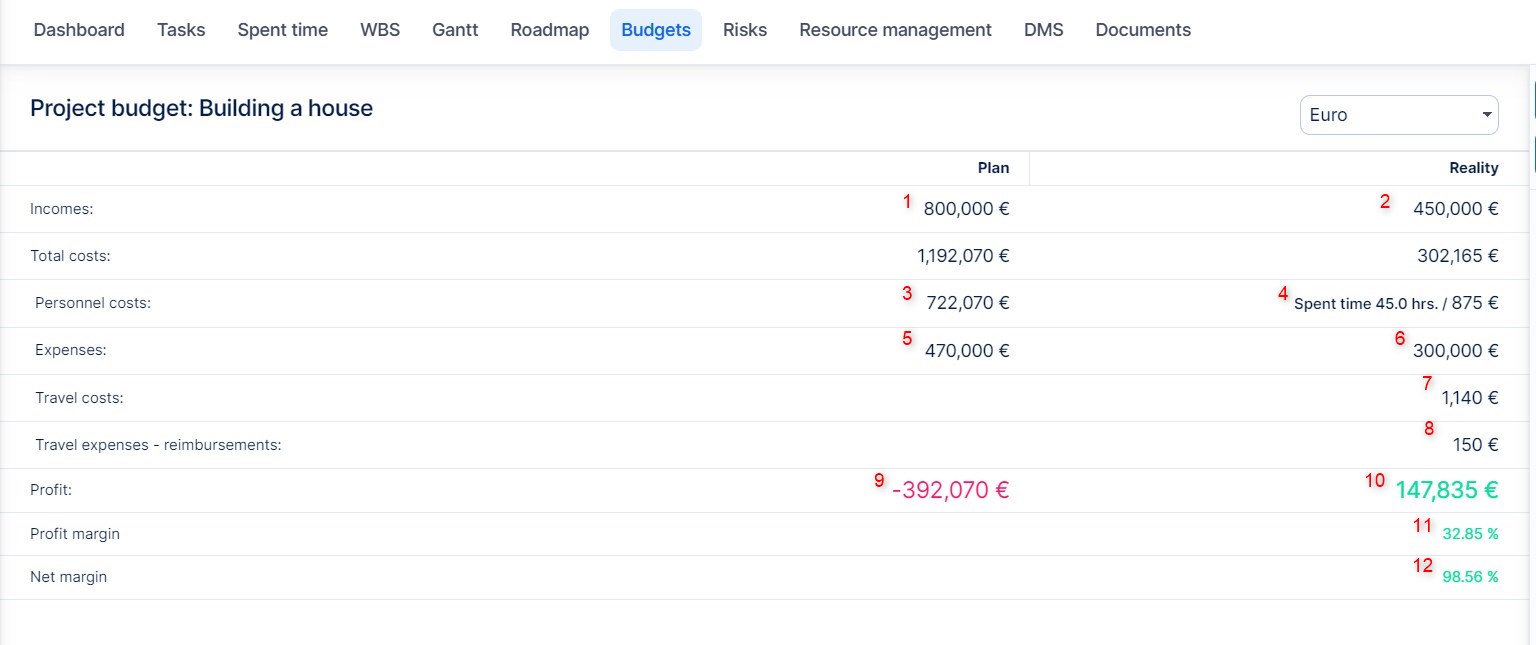
This overview image shows where each budget item appears in the Portfolio Overview. The following sections match each column by number.
1. Planned income (incl. VAT)
This is the total amount of planned income entered manually into the budget. It includes VAT and represents the forecasted earnings for the project. These values typically come from estimated contracts, deals, or internal planning.
2. Real income (incl. VAT)
This field shows actual income that has been realized for the project. It can be added manually or synchronized from the invoicing module. This value includes VAT and helps track whether planned earnings are being met.
3. Planned personnel costs

This is the estimation of labor costs based on planned hours and rate configuration. The rate may come from user, role, or activity-level settings, depending on your configuration. It's useful for budgeting human resources before work begins.
4. Real personnel costs
Calculated from real time entries logged in the project using actual internal hourly rates.
5. Planned expenses

Planned non-labor costs such as materials, software, or third-party services (entered manually).
6. Real expenses
Real non-labor expenses tracked manually or through integrated modules.
7. Travel costs

Real travel costs are calculated either from logged travel time entries or entered manually. The system uses travel cost settings such as per-unit distance rates, daily limits, and other custom travel rules set in budget settings.
8. Travel reimbursements
Expenses reimbursed to users for project-related travel. Entered manually or pulled from approval workflows.
9. Planned profit (excl. VAT)

This is a calculated value: planned income (excluding VAT) minus all planned costs (personnel, expenses, travel). It gives an early forecast of potential profitability before actual work begins.
10. Real profit (excl. VAT)
Real income (excl. VAT) minus real personnel and other expenses. Calculated field.
11. Profit margin
Real profit divided by real income, expressed as a percentage. Indicates how efficient the project is financially.
12. Net margin

This is a calculated percentage that compares net profit (real income minus all real expenses) to total income. It includes all reimbursement costs and is the most complete view of a project’s financial efficiency.
Column Behavior and Configuration
- Budget items are pulled from manually entered values or integrated time/invoice data.
- Column totals depend on settings in Administration >> Budgets or project-level Budget settings.
- Settings affect whether VAT is included, which rates apply (internal/external), and whether subprojects are included.

Global and project budget settings define calculation methods.
Rate source setting for personnel cost: internal or external rate.

Defines how planned personnel cost is calculated (planned hours * rate).

Defines source of personnel rate: user, role, or activity.

Total cost fields that include all applicable cost categories.
Related Articles
- What Is a Budget Statement and How Does It Work?
- How to Use the Portfolio Overview for Budget Insights
- User Sales Targets on a Page Template
| How would you rate this article? | |||
|


