


How to Indicate a Ticket Needs Reaction
Introduction
This guide will show you how Easy8 HelpDesk indicates that a ticket needs a reaction. The system helps users identify tickets that require their attention, even if the assignment has not changed. By following these steps, you’ll understand how the "Need reaction" attribute works and how it improves client communication.
Target Audience
Administrator
Prerequisites
Before starting, ensure you have:
- HelpDesk projects and mailboxes configured.
- Trackers and statuses correctly set.
How to Indicate a Ticket Needs Reaction
Step 1: Understand the "Need Reaction" Attribute
- Every HelpDesk ticket (and CRM case) has a "Need reaction" attribute.
- By default, this attribute is set to No.
- It will change automatically to Yes when:
- Someone (other than the assignee) updates the ticket by sending an email reply to the client.
- The assignee does not change (ticket remains assigned to the same person).
Example:
A support operator answers the client but does not reassign the ticket. The system sets "Need reaction" to Yes so the assignee knows there is something new to check.
Step 2: Where "Need Reaction" Is Shown
- The "Need reaction" attribute is visible in HelpDesk ticket lists (like All Open Tickets).
- Tickets that require reaction display a warning icon ("⚠️ Need reaction!") next to them.
- Support staff should regularly check for tickets with "Need reaction" set to Yes.
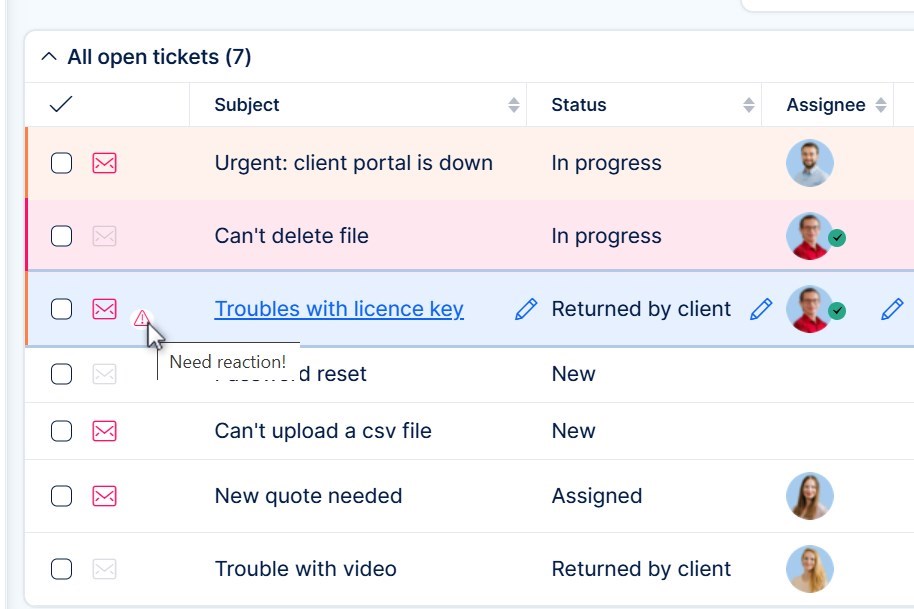
Tip: You can also use a Tasks from Filter widget on dashboards to list tickets needing reaction.
Step 3: How to Clear the "Need Reaction" Attribute
- Once the assignee updates the ticket (for example by replying or changing status), the "Need reaction" attribute will return to No.
- This way, support agents can clear their pending items easily by acting on them.
Step 4: Connection with Statuses
- Some ticket statuses like "Returned by Client" or "Consultation" indicate that client answered and reaction is needed.
- However, the "Need reaction" attribute is independent of status. It is purely based on ticket updates and assignment logic.
Troubleshooting
| Issue | Solution |
|---|---|
| Ticket updated but no reaction needed | Check if the reply came from the assigned user directly. |
| Ticket marked "Need reaction" even when resolved | Make sure users clear the reaction flag by replying, updating or closing the ticket correctly. |
Conclusion
You have successfully learned how Easy8 HelpDesk indicates tickets that need reaction. By using the "Need reaction" attribute and monitoring dashboard filters, your support team will react quickly to client updates, even when ticket assignment remains the same.
Further Reading
- Connect a Mailbox to Easy8 HelpDesk (Tutorial)
- HelpDesk Ticket Lifecycle and Communication Flow (Explanation)
- How HelpDesk Evaluates Incoming Emails (Reference)
| How would you rate this article? | |||
|


