


Introduction
This guide explains how to close, archive, or delete a project in Easy8. These options help you manage finished projects by either preserving their data for reference, hiding them from the project list, or removing them permanently. Choosing the right option depends on how you plan to use the project data in the future.
Target Audience
- Project Managers
- Administrators
Prerequisites
Before managing project status, ensure you have:
- Access to Administration or Project controls.
- Permissions to close, archive, or delete a project.
- Reviewed and completed all project-related activities.
How to Close, Archive, or Delete a Project
Option 1: Close the Project (Recommended for Lessons Learned & Reporting)
Steps:
- Go to Administration > Projects, or from the project view, use Project controls > Edit project.
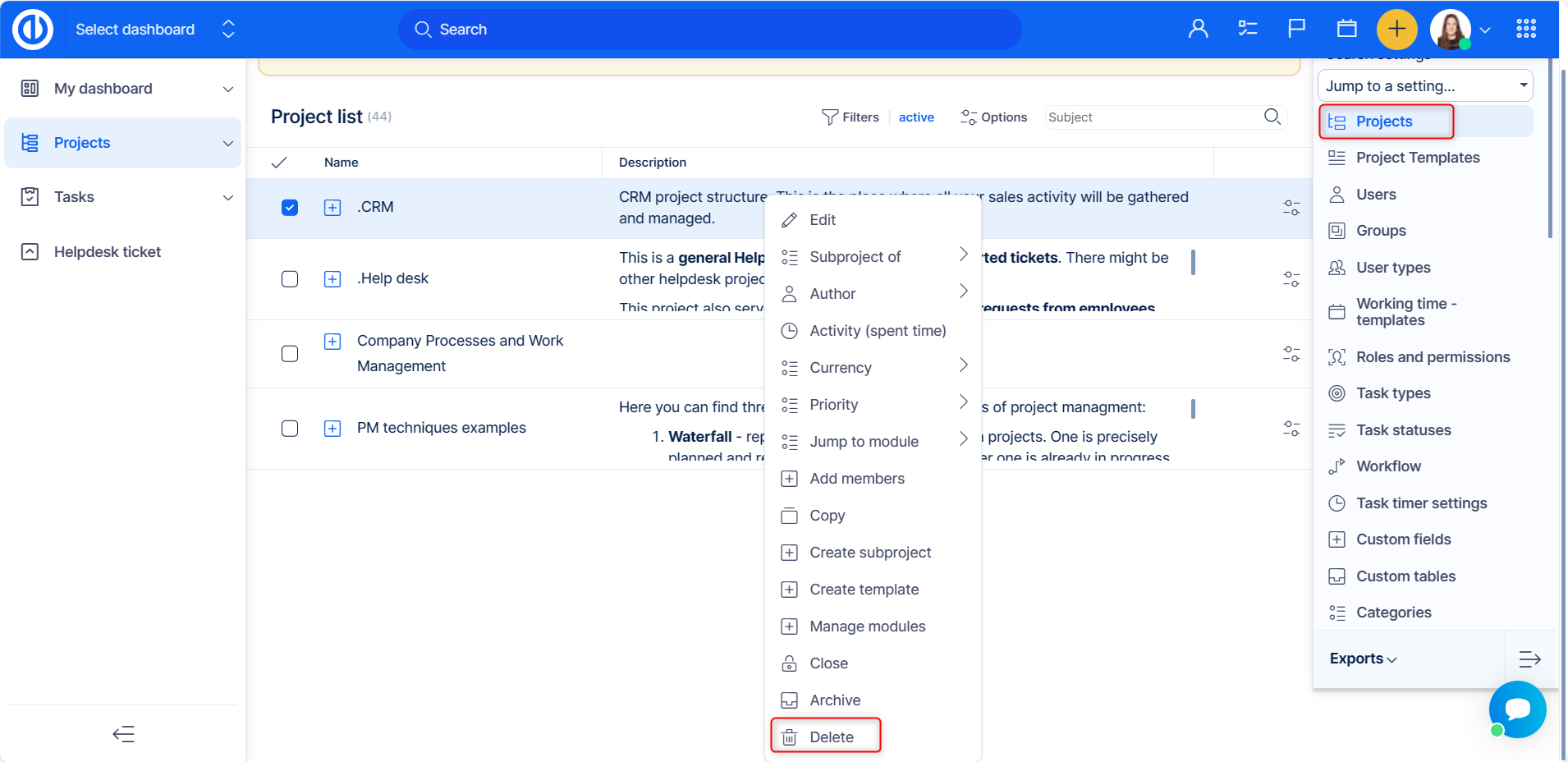
- In Administration in the project’s context menu (right-click) select Close project, in project view select Close from the right side bar.
What happens:
- The project becomes read-only for all users.
- It remains visible in the project list for all former project members.
- It is included in spent time reports.
- Only users with the permission "Close/Reopen the project" can reopen it.
When to use:
- You still want easy access to the project for lessons learned.
- You need the project to appear in time tracking and reporting.
Option 2: Archive the Project (Recommended for Long-Term Storage)
Steps:
- Go to Administration > Projects.
- Right-click the project and select Archive project.
What happens:
- The project is no longer visible in the project list.
- It can be accessed only by administrators.
- It is moved to Administration > Projects (filtered by "Archived").
- Only spent time entries remain visible.
- All other information is hidden.
When to use:
- The project is finished and you no longer need to access it regularly, but still want to preserve its data.
Option 3: Delete the Project (Permanent Removal)
Warning: This action is irreversible. Deleted projects cannot be restored.
Steps:
- Go to Administration > Projects.
- Right-click the project and choose Delete.
- Confirm the deletion by typing the project’s exact name, including spaces.
Who can do this: Only administrators have the authority to delete projects.
When to use:
- You are completely sure the project is no longer needed and the data won’t be required again.
Conclusion
Closing, archiving, or deleting a project in Easy8 allows you to manage completed work properly.
- Use Close to keep access and reporting.
- Use Archive to store data out of view.
- Use Delete only if you are certain the project and its data are no longer needed.
