


How to automate marketing campaign execution with n8n and AI
Marketing teams are drowning in scattered data, manual tasks, and tools that simply do not connect. What if you could cut the chaos, save hours every month, and finally focus on work that actually drives results? Read more to find out.
Table of contents
What problems do marketing teams actually face?
Reporting: stop copy-pasting from Google Analytics
Mailchimp analytics
Blog post distribution across channels
Brand quality control with AI
What about operations and integrations?
How to start with n8n automations for marketing
TL;DR
Manual reporting, siloed tools, and repetitive copy-pasting slow marketing teams down. This article shows real automation use cases using n8n and Easy8 to fix that.
What problems do marketing teams actually face?
Most marketing teams are juggling multiple tools, spreadsheets, and manual processes. Data lives in Google Analytics, Mailchimp, CRM systems, and Excel, none of which talk to each other. Content gets created but poorly distributed. Lessons from past campaigns are rarely recorded.
The result? Guesswork, errors, and wasted time.
Let's dive deeper into real use cases in the marketing team.
Reporting: stop copy-pasting from Google Analytics
Easy8's marketing team built an n8n workflow that pulls data from Google Analytics 4 and pastes it directly into an Excel KPI tracker.
The benefits:
- No manual input
- No mistake
- It runs automatically and supports filtering by channel, country, and dimension.
Mailchimp analytics
Mailchimp's built-in analytics sometimes misreport results. The we have created a form-triggered n8n workflow with an AI agent that queries Mailchimp directly and returns structured campaign data: open rates, click rates, and a plain-language summary.
Blog post distribution across channels
After publishing a blog post, distributing it to LinkedIn, X, Substack and other platforms takes hours.
A single form submission now triggers five specialised AI agents, one per platform, each writing optimised content within the platform's character limits and tone requirements. The output lands as a task in Easy8, ready for review.
Brand quality control with AI
The team built a brand guidelines prompt, stored on GitHub, that AI agents reference when generating content. It includes colour palettes, tone rules, dos and don'ts, keeping content on-brand without a manual review for every piece.
What about operations and integrations?
Three operational automations stand out:
- Exporting Zoom webinar attendees to Mailchimp and triggering a double opt-in sequence, previously done manually after every webinar.
- A sales insights feed: when a new deal is created in the CRM, an AI agent extracts key information from call notes using the MEDDIC sales methodology and posts it to a Microsoft Teams marketing channel.
- A simple AWS-to-Teams notification that tells the team when a website update goes live, removing a chain of manual messages.
These three highest-impact automations (reporting, sales insight gathering, and lead enrichment) save the team over 12 hours per month.
More importantly, this WorkOps framework frees up time for creative work that actually requires human thinking.
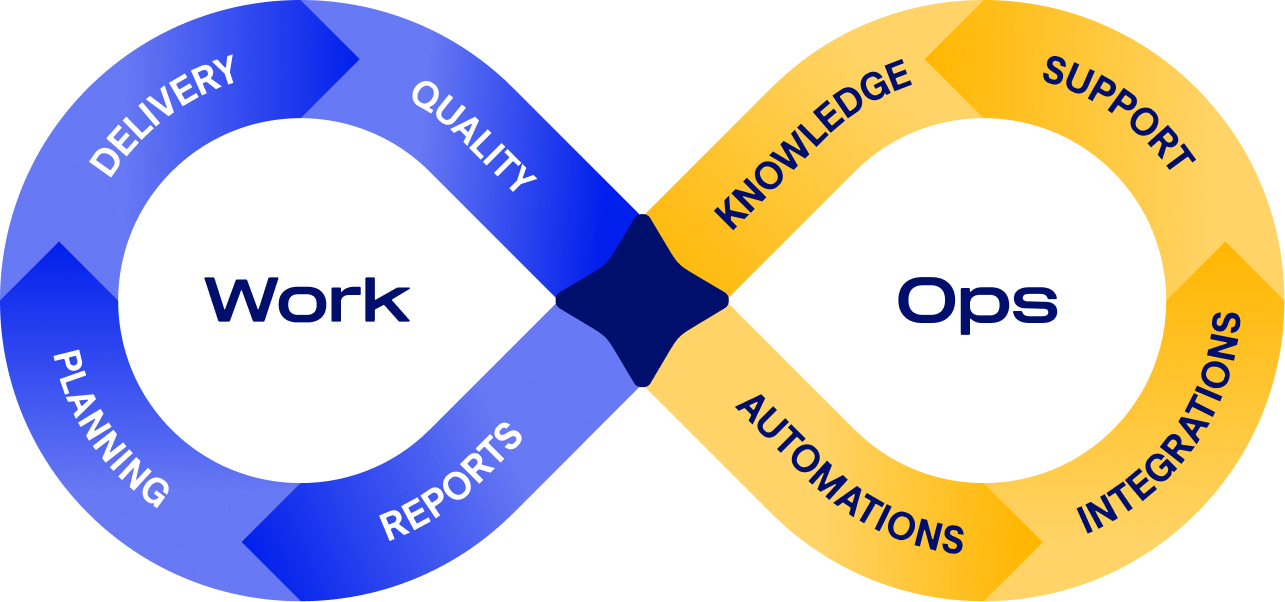
WorkOps infinity loop
How to start with n8n automations for marketing
If you got inspired by any of the above-mentioned automations, take action:
- Identify repetitive or error-prone tasks in your current workflow
- Slice the process into smaller steps and automate one at a time
- Measure whether the automation delivers value
- Expand gradually until the full process runs without manual input
Watch the full webinar recording to see each automation running live using the WorkOps approach, including the n8n canvas walkthroughs and AI agent prompts!
Also, take a look at our Easy8 Workflow Catalogue, a library of pre-built automation templates (built primarily on the n8n engine) designed to connect different software tools and automate manual tasks.

Frequently asked questions
Do we need to abandon our existing tools to implement WorkOps?
Absolutely not. WorkOps acts as an intelligent orchestration layer above your existing tools, making them work together more effectively. Whether you use Jira, Easy8, Microsoft Teams, SAP or Hubspot, WorkOps enhances rather than replaces your tech stack.
Is WorkOps just another project management methodology?
No, WorkOps isn’t just another project management methodology. It’s a framework. Imagine an ecosystem of work that blends both work and operations into a single framework. Instead of separating project delivery from day-to-day operations, WorkOps unifies them, enabling methodologies like Agile and Waterfall to coexist and ensuring continuous flow across the entire organisation.
Related articles

AI WorkOps for project managers: 4 real automation scenarios
What if your projects could move forward on their own, without chasing updates, copying data, or sitting through endless meetings? Discover how the WorkOps framework and simple n8n automations give project managers back hours every week while keeping every project step connected and under control.

n8n and AI workflows for product teams: 2 real use cases
Discover how integrating AI and automation into your product lifecycle can eliminate manual friction and accelerate value delivery. Explore "WorkOps", a framework inspired by DevOps, to unify teams, data, and processes through continuous loops of improvement.

Tool sprawl: Stop being the human bridge between your apps
Too many tools, fragmented data, and frustrated teams? WorkOps is a modern framework that helps you orchestrate your existing tech stack instead of replacing it. Here's how to get started and get rid of tool sprawl.
