


What is the best workflow automation software?
Workflow automation tools generally fall into three buckets: no-code SaaS connectors, enterprise/iPaaS orchestration, and RPA for legacy desktop steps.
If you’re in a Microsoft ecosystem, Power Automate is often the most natural fit; if you need bot-driven UI automation, UiPath is a common enterprise choice.
For many teams, though especially those who want control, extensibility, and the option to self-host n8n, it is the best option. It balances a visual builder with “drop into code” flexibility and avoids vendor lock-in compared with purely hosted, template-driven tools.
Bottom line: pick n8n if you value ownership and customization, and choose a more managed platform only if you strongly prefer turnkey governance and support.
Related content
What is the difference between manual and automated workflows?
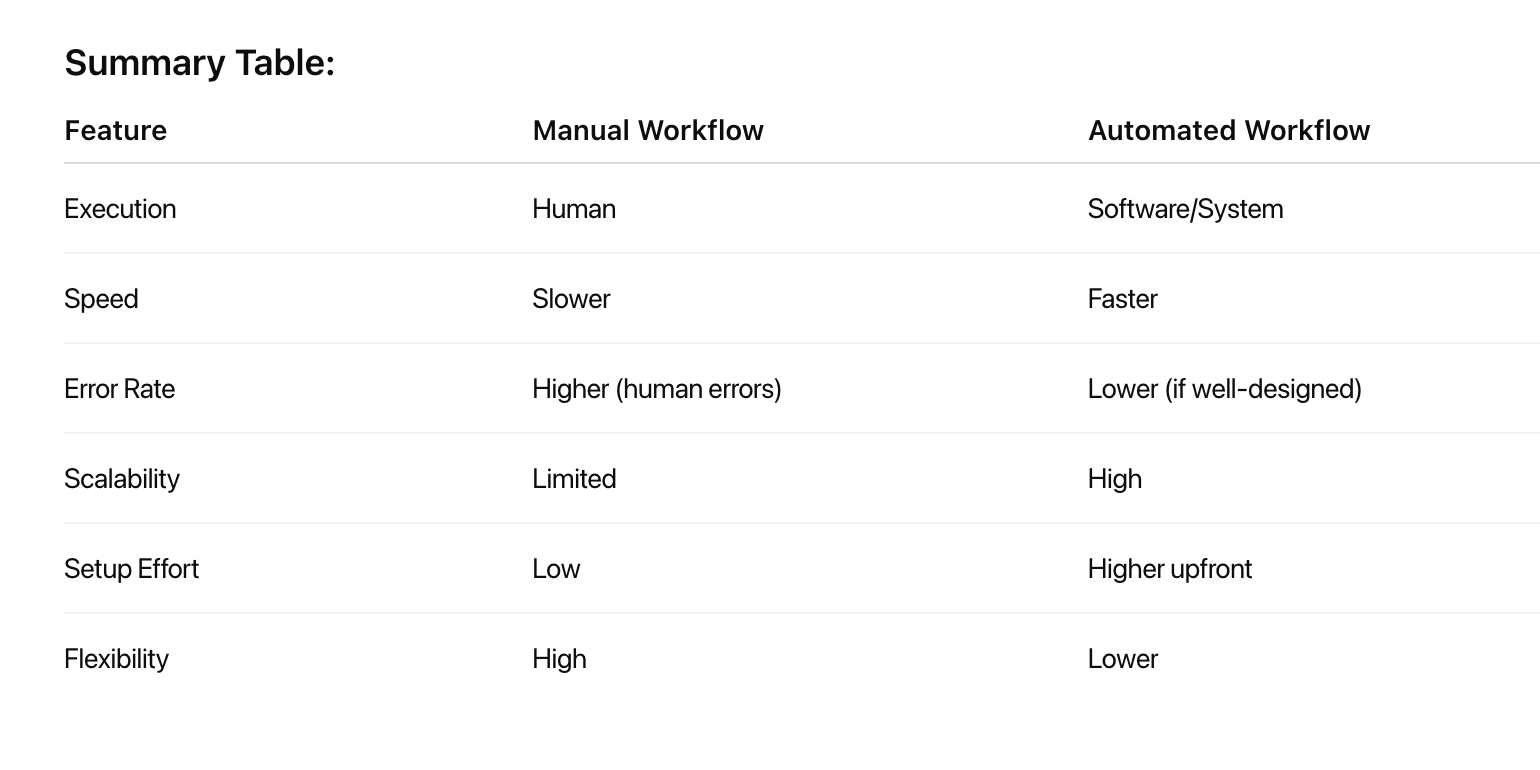
The fundamental distinction between manual and automated workflows lies in how tasks are executed, managed, and completed within business processes. Understanding these differences is crucial for organizations evaluating their operational efficiency and considering automation investments.
- Manual workflows rely on human intervention at every step, where employees perform tasks through direct action, decision-making, and coordination. These processes typically involve paper-based forms, email communications, spreadsheet management, and personal oversight of task progression.
- Automated workflows use technology and software systems to execute predefined tasks with minimal human intervention. These systems follow pre-established rules and triggers to move work forward automatically, handling routine operations without constant manual oversight.
Key differences comparison:
Which tool is used for workflow automation?
The tools used for workflow automation, as shown in the report by Similarweb, are:
- n8n
- Gumloop
- Zapier
- Make
These platforms help users connect apps, automate tasks, and orchestrate complex business logic with minimal or no code, streamlining operations and reducing the need for manual processes.
What are examples of workflow automation?
Examples of workflow automation span a wide range of business functions and industries, typically aimed at automating repetitive and manual tasks to boost efficiency, accuracy, and productivity.
Here are some concrete examples:
- Employee onboarding and offboarding: Automating the collection and sharing of new hire information across departments like HR, Payroll, and IT; offboarding workflows ensure security and information continuity when employees leave.
- Expense reimbursement: Employees submit online reimbursement requests which are routed automatically for manager approval, finance evaluation, and payroll integration, sometimes with rules for automatic approval of small expenses.
- Employee status changes: Automate updating employee status data across HRIS and other systems when promotions or terminations occur, sending notifications for each change.
- Customer service workflows: Automate case creation, customer ID verification, dispute handling, and notifications to speed up support and improve case resolution quality.
- Sales workflows: Automate quote creation, contract approvals, onboarding new customers, follow-up reminders, and renewal reminders to reduce admin work and accelerate sales cycles.
- Marketing workflows: Automate social media post scheduling, negative review responses, customer opt-out management, lead generation reports, and engagement tracking.
- IT support workflows: Automate employee account setups, software/device requests, project requests, and service ticket handling to accelerate IT operations.
- Project and task automation: Automatically assign tasks based on status changes, deadlines, and availability; streamline sprint planning and bug triage in product development.
- Customer support ticketing: Ticket routing, acknowledgment, and resolution tracking through automated systems reduce response times and free staff for complex issues.
