


Introduction
The project dashboard is the central hub where users can view project details, track progress, and manage tasks efficiently. It provides an overview of key project metrics, status updates, and shortcuts to important project functions. Understanding how to navigate the dashboard is essential for effective project management.
Target Audience
- Project Managers
- Team Members
- Administrators
Understanding Project Dashboards and Navigation
Definition
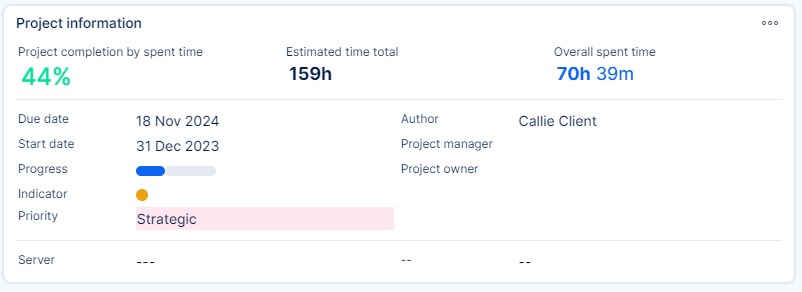
A project dashboard is a visual interface that provides a summary of the project’s performance, including, but not limited to:
- Project Status – An overview of project progress.
- Task Overview – A list of ongoing, completed, and overdue tasks.
- Key Metrics – Budget, time tracking, and workload distribution.
- Recent Activity – A feed of the latest updates related to the project.
- Quick Actions – Shortcuts for common project management tasks.
How It Works
- Accessing the Dashboard
- Navigate to the project section in the system.
- Select the project you want to view.
- The dashboard loads with an overview of the project's key information.
- Navigating Key Sections
- Main Panel – Displays critical project data such as progress bars, charts, and reports.
- Side Menu – Provides navigation links to different project sections (Tasks, Team, Settings, Reports).
- Toolbar – Includes options for quick edits, filtering views, and exporting data.
- Widgets – Customizable components that display relevant project data.
- Customizing the Dashboard
- Users can add, remove, or rearrange widgets (based on their permissions).
- Filters allow users to display relevant data (e.g., tasks assigned to them).
- Some dashboards support layout adjustments for better visibility.
Examples
- A project manager checking the task progress of their team.
- A team member reviewing upcoming deadlines on the dashboard.
- An administrator configuring widgets to display key performance indicators.
Common Misconceptions
| Misconception | Clarification |
|---|---|
| The dashboard shows real-time updates automatically. | Some data may require manual refresh to display the latest changes. |
| All users see the same dashboard layout. | Dashboard views may vary based on user roles and permissions. |
Conclusion
Project dashboards are essential for monitoring and managing projects efficiently. They provide a real-time overview of progress, key metrics, and team activity. Understanding how to navigate and customize dashboards helps users streamline their workflow and enhance productivity.
