


Introduction
Project modules in Easy8 are features that enhance project management by allowing customization based on specific needs. Understanding how to activate and manage these modules ensures that teams work efficiently and utilize only necessary functionalities.
Target Audience
- Project Managers
- Administrators
- Team Members
Understanding Project Modules and Their Uses
Definition
Project modules are individual components that can be enabled or disabled within a project. These modules provide functionalities such as:
- Task tracking
- Budgeting
- Time management
- Collaboration tools
This allows teams to tailor their project environment effectively.
How It Works
Activating Modules in a Project
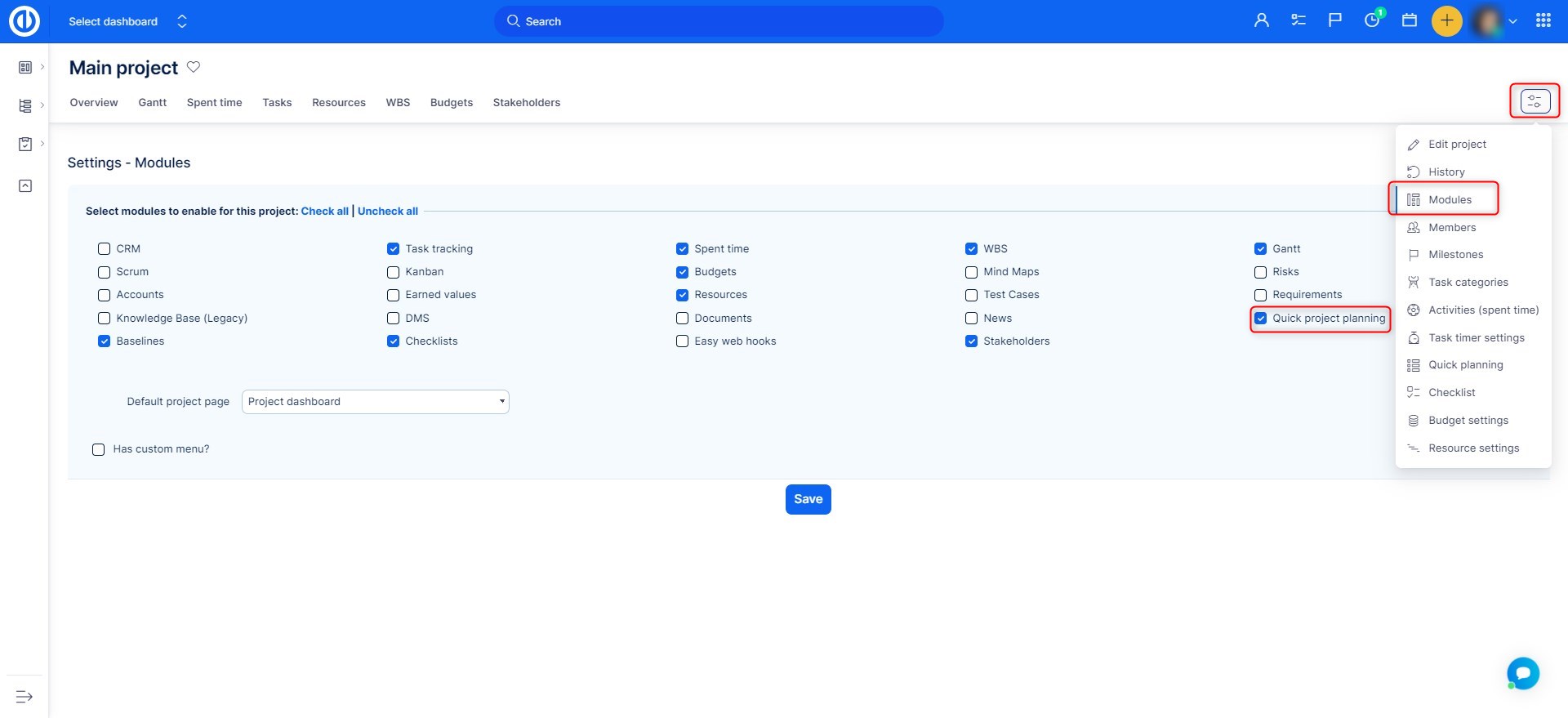
- Navigate to Project Settings
- Open the project where you want to activate or manage modules.
- Click on the Settings icon top right.
- Access the Modules Section
- Select the Modules option.
- A list of available modules for the project will be displayed.
- Enable or Disable Modules
- Check the boxes for the modules you want to activate.
- Uncheck modules that are not needed to streamline the project environment.
- Some modules may require additional configuration after activation.
- Save Changes
- After selecting the necessary modules, click Save to apply the changes.
- The activated modules will now be available within the project interface.
Where Activated Modules Appear
- Project Navigation Menu – Most enabled modules will appear as separate tabs in the project navigation.
- Project Overview Page – Some modules integrate into the main dashboard, displaying relevant widgets.
- Sidebar or Dedicated Sections – Certain modules, like reports or finance tracking, may be accessed from the sidebar.
Examples
- A project manager activates the Time Tracking module to monitor team hours.
- A development team enables the Task Management module to organize work effectively.
- A finance team activates the Budgeting module to track project costs.
Common Misconceptions
| Misconception | Clarification |
|---|---|
| All modules should be activated for every project. | It’s best to enable only necessary modules to keep the interface clean and efficient. |
| Modules work independently. | Many modules integrate with each other to improve workflow. |
| Only administrators can activate modules. | Users with the appropriate permissions can manage module activation. |
Conclusion
Project modules provide essential tools to customize and optimize project management workflows. Knowing how to activate and utilize these modules helps teams work more efficiently while keeping the project environment organized.
